Since 2014 a Lambda function has been one thing: a handler that receives an event, runs alone in its execution environment, and is billed for every millisecond between start and return. Running a web application on it meant translating HTTP into events and back, through API Gateway, a function URL or an adapter layer, and paying for the time each request spent waiting on a database.
On 12 October AWS announced a second form factor. A Lambda Web Function is an ordinary HTTP server. Your code listens on a port, one execution environment serves many requests at once, and compute is billed by CPU time used and not by elapsed time. This article looks at what that changes for an architect: the contract a server has to meet, what the billing model rewards and punishes, and where a Web Function sits against a function URL, API Gateway and App Runner. The server in the sample was run and measured locally, and the cost model was checked against AWS’s own worked examples. Nothing was deployed, and the article is explicit about what that leaves untested.
What was announced
| Event Function (the existing model) | Web Function | |
|---|---|---|
| Your code is | A handler invoked once per event | An HTTP server listening on a port |
| Concurrency | One request per execution environment | Up to 128 requests per environment, 64 by default |
| Compute billing | Configured memory multiplied by elapsed time | Active vCPU time, plus memory for the life of the environment |
| Runtime at launch | All Lambda runtimes | Node.js 24 on Arm64 only |
| Environment size | Configured | 2 vCPUs and 2 GB |
| Endpoint | Function URL, API Gateway, load balancer or an event source | A built-in HTTPS endpoint; optional multi-Region routing behind one domain |
| Deploy unit | Version and alias | Immutable revision; an endpoint routes to one or two revisions by weight |
| Scales to zero | Yes | Yes |
AWS describes three form factors on the same Firecracker isolation: Event Functions, Web Functions, and MicroVMs for running untrusted code. At launch Web Functions are available in five Regions, including Europe (Ireland). An endpoint is either IamAuth, where callers sign requests, or ApplicationManaged, which is public and leaves authentication to your code. Custom domains, caching and a web application firewall come from putting CloudFront in front.
The contract: listen where you are told
The whole integration is one environment variable. Lambda sets AWS_LAMBDA_HTTP_ENDPOINT to a host and port, and the server must be listening there within ten seconds. There is no handler signature and no event object. This is the sample: an appointments API on Node’s built-in http module, with no dependencies and no Lambda-specific code beyond reading that variable.
// An appointments API as an ordinary HTTP server. No Lambda handler, no adapter, no dependencies.
// Lambda Web Functions tell the server where to listen through AWS_LAMBDA_HTTP_ENDPOINT (host:port);
// on a laptop the same variable, or the default below, does the same job.
'use strict';

const http = require('node:http');
const crypto = require('node:crypto');
const { setTimeout: sleep } = require('node:timers/promises');

// Synthetic data. No real patients, clinics or clinicians.
const APPOINTMENTS = [
  { id: 'apt-1001', clinic: 'north', start: '2026-10-19T09:00:00Z', status: 'booked' },
  { id: 'apt-1002', clinic: 'north', start: '2026-10-19T09:30:00Z', status: 'free' },
  { id: 'apt-1003', clinic: 'south', start: '2026-10-19T10:00:00Z', status: 'booked' },
];

// Start-up work that must not delay listening: the platform expects the port to be open within
// ten seconds, and routes requests as soon as it is. Handlers that need the result await it.
let ready;
function warmUp() {
  ready ??= sleep(20).then(() => ({ loadedAt: new Date().toISOString() }));
  return ready;
}

function send(res, status, body, headers = {}) {
  const payload = JSON.stringify(body);
  res.writeHead(status, { 'content-type': 'application/json', 'content-length': Buffer.byteLength(payload), ...headers });
  res.end(payload);
}

// Lambda appends the connecting client's address as the last value. Earlier values are whatever the
// caller sent, so only the last one is trusted.
function clientAddress(req) {
  const forwarded = String(req.headers['x-forwarded-for'] ?? '').split(',').map((part) => part.trim()).filter(Boolean);
  return forwarded.at(-1) ?? req.socket.remoteAddress;
}

async function route(req, res) {
  const url = new URL(req.url, 'http://placeholder');
  const requestId = req.headers['lambda-web-request-id'] ?? crypto.randomUUID();

  if (req.method === 'GET' && url.pathname === '/healthz') {
    return send(res, 200, { status: 'ok' });
  }

  if (req.method === 'GET' && url.pathname === '/api/appointments') {
    await warmUp();
    const clinic = url.searchParams.get('clinic');
    const items = clinic ? APPOINTMENTS.filter((a) => a.clinic === clinic) : APPOINTMENTS;
    return send(res, 200, { items, requestId, client: clientAddress(req) });
  }

  // Stands in for a call to a database or another service: the request waits and uses almost no CPU.
  if (req.method === 'GET' && url.pathname === '/api/slow') {
    const wait = Math.min(Number(url.searchParams.get('ms') ?? 50), 5000);
    await sleep(wait);
    return send(res, 200, { waitedMs: wait, requestId });
  }

  // Stands in for CPU-bound work. In a single-threaded server this blocks every other request.
  if (req.method === 'GET' && url.pathname === '/api/cpu') {
    const rounds = Math.min(Number(url.searchParams.get('rounds') ?? 200000), 2000000);
    let digest = Buffer.alloc(32);
    for (let i = 0; i < rounds; i++) {
      digest = crypto.createHash('sha256').update(digest).digest();
    }
    return send(res, 200, { rounds, digest: digest.toString('hex').slice(0, 16), requestId });
  }

  // Server-sent events: the response is written as it is produced.
  if (req.method === 'GET' && url.pathname === '/events') {
    const count = Math.min(Number(url.searchParams.get('count') ?? 5), 100);
    res.writeHead(200, { 'content-type': 'text/event-stream', 'cache-control': 'no-cache' });
    for (let i = 1; i <= count; i++) {
      res.write(`data: ${JSON.stringify({ sequence: i, of: count })}\n\n`);
      await sleep(10);
    }
    return res.end();
  }

  return send(res, 404, { error: 'not found', requestId });
}

function createServer() {
  return http.createServer((req, res) => {
    route(req, res).catch(() => {
      // Never put request content in an error response or a log line.
      if (!res.headersSent) send(res, 500, { error: 'internal error' });
      else res.destroy();
    });
  });
}

function listenAddress() {
  const [host, port] = (process.env.AWS_LAMBDA_HTTP_ENDPOINT || '127.0.0.1:3000').split(':');
  return { host, port: Number(port) };
}

if (require.main === module) {
  const server = createServer();
  const { host, port } = listenAddress();
  server.listen(port, host, () => console.log(JSON.stringify({ event: 'listening', host, port })));
  warmUp();

  // The platform allows about one second after SIGTERM, and does not promise the signal arrives.
  // Flush what is cheap to flush and leave; do not start new work here.
  process.on('SIGTERM', () => {
    console.log(JSON.stringify({ event: 'sigterm' }));
    process.exit(0);
  });
}

module.exports = { createServer, listenAddress };
Four details in that file come straight from the platform’s documented behaviour.
- Listen first, initialise after. Requests are routed as soon as the port is open, and the port has to open within ten seconds. Start-up work that takes time runs after
listen, and handlers that need it await it. - Trust only the last forwarded address. Lambda appends the connecting client’s address to
X-Forwarded-For. Earlier values are whatever the caller sent. - Use the platform’s request id. Lambda adds
lambda-web-request-idto each request and to the response, which is what ties an application log line to the platform’s. - Expect an abrupt end. On scale-in Lambda stops routing, lets in-flight requests finish on a best-effort basis, sends
SIGTERMand allows about one second. It also says not to rely on the signal arriving. Anything that must not be lost has to be written before the response, not in a shutdown hook.
The same file runs on a laptop with node index.js. In CI it passed its eight tests on Node.js 24, and started as a separate process with the variable set, it answered its health check and exited with code 0 within 10 milliseconds of SIGTERM. Deployment is one command, aws lambda-web deploy --name appointments --code ./app, which was not run for this article.
What the billing model meters
The pricing change is easy to state and its consequences are easy to miss. An Event Function is charged for configured memory over the full duration of each request, including time spent waiting. A Web Function is charged for CPU time the process uses, and separately for memory for as long as an execution environment exists, busy or idle.
To put numbers on the difference, the sample runs the server as its own process, drives load at it, and reads the server’s CPU time from the operating system, so the load generator is not counted.
// Measures what a Web Function is billed for. The server runs as its own process, as it does on the
// platform, and its CPU time is read from the operating system, so the load generator is not counted.
// Linux only (reads /proc). Usage: node measure.js [metrics.json]
'use strict';

const { spawn } = require('node:child_process');
const fs = require('node:fs');
const { performance } = require('node:perf_hooks');
const { setTimeout: sleep } = require('node:timers/promises');

const PORT = 38081;
const BASE = `http://127.0.0.1:${PORT}`;
const TICKS_PER_SECOND = 100; // USER_HZ on Linux

function cpuSecondsOf(pid) {
  const fields = fs.readFileSync(`/proc/${pid}/stat`, 'utf8').split(') ')[1].split(' ');
  return (Number(fields[11]) + Number(fields[12])) / TICKS_PER_SECOND; // utime + stime
}

async function measure(pid, work) {
  const cpuBefore = cpuSecondsOf(pid);
  const started = performance.now();
  const requestSeconds = await work();
  return {
    wallSeconds: Number(((performance.now() - started) / 1000).toFixed(2)),
    sumOfRequestDurationsSeconds: Number(requestSeconds.toFixed(2)),
    serverCpuSeconds: Number((cpuSecondsOf(pid) - cpuBefore).toFixed(2)),
  };
}

async function timed(url) {
  const started = performance.now();
  await (await fetch(url)).arrayBuffer();
  return (performance.now() - started) / 1000;
}

async function main() {
  const server = spawn(process.execPath, ['index.js'], { cwd: __dirname, env: { ...process.env, AWS_LAMBDA_HTTP_ENDPOINT: `127.0.0.1:${PORT}` }, stdio: 'ignore' });
  try {
    for (let i = 0; i < 100; i++) {
      try { await timed(`${BASE}/healthz`); break; } catch { await sleep(50); }
    }

    // 1,280 requests that each wait 200 ms on I/O, 128 at a time.
    const ioBound = await measure(server.pid, async () => {
      let total = 0;
      for (let batch = 0; batch < 10; batch++) {
        total += (await Promise.all(Array.from({ length: 128 }, () => timed(`${BASE}/api/slow?ms=200`)))).reduce((a, b) => a + b, 0);
      }
      return total;
    });

    // 20 requests of hashing, one after another.
    const cpuBound = await measure(server.pid, async () => {
      let total = 0;
      for (let i = 0; i < 20; i++) total += await timed(`${BASE}/api/cpu?rounds=200000`);
      return total;
    });

    // One long CPU-bound request, and a health check sent while it is running.
    const long = timed(`${BASE}/api/cpu?rounds=1500000`);
    await sleep(150);
    const healthCheckSeconds = Number((await timed(`${BASE}/healthz`)).toFixed(2));
    const longRequestSeconds = Number((await long).toFixed(2));

    const metrics = { node: process.version, ioBound: { requests: 1280, ...ioBound }, cpuBound: { requests: 20, ...cpuBound }, blocking: { longRequestSeconds, healthCheckSeconds } };
    console.log(JSON.stringify(metrics, null, 2));
    if (process.argv[2]) fs.writeFileSync(process.argv[2], JSON.stringify(metrics, null, 2));
  } finally {
    server.kill('SIGTERM');
  }
}

main().catch((error) => { console.error(error); process.exit(1); });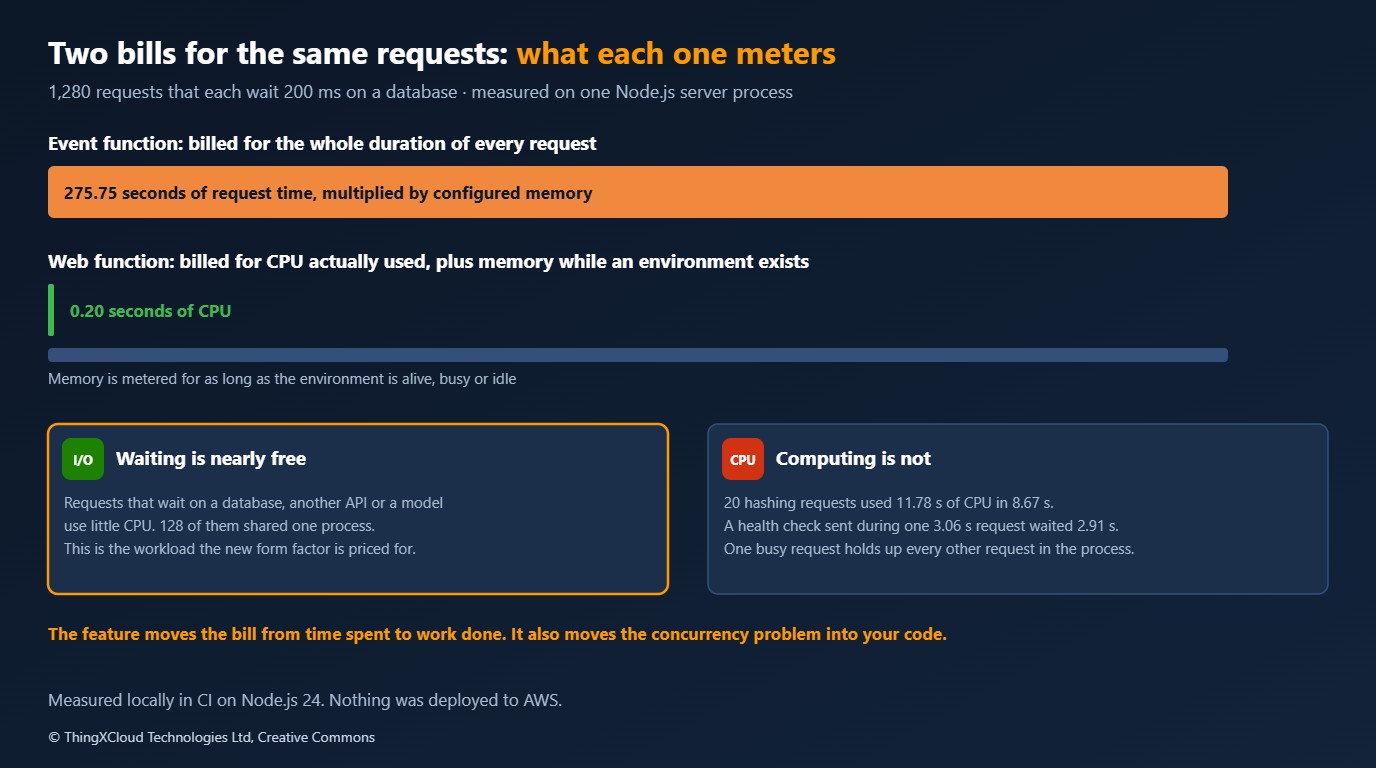
| Measurement on one server process | Requests | Sum of request durations | Server CPU time |
|---|---|---|---|
| Each waits 200 ms on I/O, 128 at a time | 1,280 | 275.75 s | 0.20 s |
| Each hashes in a loop, one at a time | 20 | 8.67 s | 11.78 s |
The first row is the case the feature is built for. Those 1,280 requests accumulated 275.75 seconds of request time, which is what an Event Function would meter, and the server used a fifth of a second of CPU to serve them. One process handled 128 at a time without difficulty, because a request that is waiting costs the event loop nothing.
The second row is the warning. CPU-bound requests used more CPU time than elapsed time, since the runtime’s helper threads work alongside the main one. And a third measurement shows what that work does to everything else: a health check sent while one 3.06-second hashing request was running took 2.91 seconds to answer. AWS’s documentation says it plainly: Node.js is single-threaded, so synchronous CPU-intensive work blocks every concurrent request in that environment. With one request per environment that never mattered. With 64 or 128 sharing a process, a single slow synchronous path becomes latency for all of them.
Code written for one request per environment often keeps request state in module-level variables, because nothing else could be running. In a Web Function that is a data leak between users. Before moving a handler, look for module-level state that holds anything about a request, a user or a tenant, and for synchronous work: large JSON parsing, compression, cryptography, template rendering in a loop.
A cost model checked against AWS’s arithmetic
Without a deployment there is no bill to show, so the model has to earn trust another way. AWS publishes four worked examples for Web Functions on the Lambda pricing page. The model reproduces all four to within one cent before it is used for anything else.
"""Monthly cost of one HTTP workload on four ways of running it on AWS.

    python model.py                  the comparison table for the scenarios in this file
    python model.py --json           the same as JSON

The point of the model is the shape of each bill, not the totals: which quantity each option meters.
  web function        requests + CPU time actually used + memory for as long as an environment exists
  event function      requests + memory x wall-clock duration of every request
  HTTP API in front   the event function, plus a charge per request
  App Runner          vCPU and memory per hour while instances are active, memory per hour otherwise
Rates are in rates.json. Free tiers and data transfer are excluded.
"""
from __future__ import annotations

import argparse
import json
import math
import pathlib
from dataclasses import dataclass

RATES = json.loads(pathlib.Path(__file__).with_name("rates.json").read_text(encoding="utf-8"))
SECONDS_PER_MONTH = 30 * 24 * 3600


@dataclass(frozen=True)
class Workload:
    name: str
    requests: int               # per 30-day month
    cpu_ms: float               # CPU time one request actually uses
    duration_ms: float          # how long one request takes end to end
    memory_gb: float            # memory the server process uses
    busy_hours_per_day: float   # hours a day with traffic; outside them there is none


def web_function(w: Workload, environments: float = 1.0, always_on: bool = True) -> dict:
    """Requests, active CPU, and memory for the life of each environment."""
    rates = RATES["web_function"]
    alive_seconds = SECONDS_PER_MONTH if always_on else w.busy_hours_per_day * 3600 * 30
    cpu = w.requests * w.cpu_ms / 1000 * rates["active_vcpu_second"]
    memory = w.memory_gb * alive_seconds * environments * rates["memory_gb_second"]
    requests = w.requests / 1e6 * rates["per_million_requests"]
    return {"cpu": cpu, "memory": memory, "requests": requests, "total": cpu + memory + requests}


def event_function(w: Workload, configured_memory_gb: float, architecture: str = "arm", http_api: bool = False) -> dict:
    """Requests, and configured memory for the whole duration of every request, waiting included."""
    rates = RATES["event_function"]
    compute = w.requests * w.duration_ms / 1000 * configured_memory_gb * rates[f"gb_second_{architecture}"]
    requests = w.requests / 1e6 * rates["per_million_requests"]
    gateway = w.requests / 1e6 * RATES["http_api"]["per_million_requests"] if http_api else 0.0
    return {"compute": compute, "requests": requests, "gateway": gateway, "total": compute + requests + gateway}


def app_runner(w: Workload, vcpu: float = 1.0, memory_gb: float = 2.0, concurrency: int = 80) -> dict:
    """Instances are charged for vCPU and memory while active and for memory alone while idle."""
    rates = RATES["app_runner"]
    busy_seconds = w.busy_hours_per_day * 3600 * 30
    in_flight = w.requests * w.duration_ms / 1000 / busy_seconds if busy_seconds else 0.0
    instances = max(1, math.ceil(in_flight / concurrency))
    active_hours = w.busy_hours_per_day * 30
    idle_hours = 24 * 30 - active_hours
    active = instances * active_hours * (vcpu * rates["active_vcpu_hour"] + memory_gb * rates["gb_hour"])
    idle = idle_hours * memory_gb * rates["gb_hour"]
    return {"active": active, "idle": idle, "instances": instances, "total": active + idle}


SCENARIOS = [
    Workload("I/O-heavy API: 10M requests, 50 ms CPU inside a 300 ms request", 10_000_000, 50, 300, 0.29, 24),
    Workload("Streaming endpoint: 5M requests, 200 ms CPU inside a 3 s response", 5_000_000, 200, 3000, 0.50, 24),
    Workload("CPU-bound API: 10M requests, 280 ms CPU inside a 300 ms request", 10_000_000, 280, 300, 0.29, 24),
    Workload("Internal tool: 60,000 requests in office hours, 50 ms CPU inside 300 ms", 60_000, 50, 300, 0.29, 8),
]


def compare(w: Workload) -> dict:
    return {
        "workload": w.name,
        "web_function_always_on": round(web_function(w)["total"], 2),
        "web_function_scaled_to_zero_off_hours": round(web_function(w, always_on=False)["total"], 2),
        "event_function_url_512mb": round(event_function(w, 0.5)["total"], 2),
        "event_function_http_api_512mb": round(event_function(w, 0.5, http_api=True)["total"], 2),
        "app_runner_1vcpu_2gb": round(app_runner(w)["total"], 2),
    }


def main() -> None:
    parser = argparse.ArgumentParser()
    parser.add_argument("--json", action="store_true")
    rows = [compare(w) for w in SCENARIOS]
    if parser.parse_args().json:
        print(json.dumps(rows, indent=2))
        return
    for row in rows:
        print(row["workload"])
        for key, value in row.items():
            if key != "workload":
                print(f"  {key:<40} ${value:>10,.2f}")
        print()


if __name__ == "__main__":
    main()
{
"_comment": "US East (N. Virginia), USD. Read from the AWS pricing pages named in 'source'. Free tiers and data transfer are left out, as they are in AWS's own worked examples.",
"web_function": {
"source": "https://aws.amazon.com/lambda/pricing/ (Web Functions, Arm)",
"active_vcpu_second": 0.0000276944,
"memory_gb_second": 0.0000036667,
"per_million_requests": 0.30
},
"event_function": {
"source": "https://aws.amazon.com/lambda/pricing/ (Event Functions)",
"gb_second_arm": 0.0000133334,
"gb_second_x86": 0.0000166667,
"per_million_requests": 0.20
},
"http_api": {
"source": "https://aws.amazon.com/api-gateway/pricing/ (HTTP APIs, first 300 million requests a month)",
"per_million_requests": 1.00
},
"app_runner": {
"source": "https://aws.amazon.com/apprunner/pricing/",
"active_vcpu_hour": 0.064,
"gb_hour": 0.007
}
}"""python test_model.py
The model is checked against the worked examples AWS publishes on its own pricing pages. If it cannot
reproduce those to the cent, nothing else it prints deserves to be read.
"""
import sys
from model import SCENARIOS, Workload, app_runner, compare, event_function, web_function
passed = failed = 0
def check(name: str, actual: float, expected: float, tolerance: float = 0.011) -> None:
global passed, failed
ok = abs(actual - expected) <= tolerance
passed += ok
failed += not ok
print(f"{'ok ' if ok else 'FAIL'} {name}: {actual:,.2f} (published {expected:,.2f})")
# Lambda pricing page, Web Functions examples 1 to 4: one environment for 30 days.
published = [
("AWS example 1, server-side rendered app", Workload("", 15_000_000, 40, 0, 0.49, 24), 25.78),
("AWS example 2, I/O-heavy API", Workload("", 10_000_000, 50, 0, 0.29, 24), 19.61),
("AWS example 3, authorization middleware", Workload("", 100_000_000, 12, 0, 0.14, 24), 64.56),
("AWS example 4, LLM streaming endpoint", Workload("", 5_000_000, 200, 3000, 0.50, 24), 33.94),
]
for name, workload, total in published:
check(name, web_function(workload)["total"], total)
# App Runner pricing page, example 2: 1 vCPU and 2 GB, active 8 hours a day, memory provisioned all day.
# AWS prints $25.50 from daily figures rounded to cents; unrounded arithmetic gives $25.44.
runner = app_runner(Workload("", 80 * 8 * 3600 * 30, 0, 100, 2.0, 8))
check("App Runner example 2, lightweight API (AWS rounds daily figures)", runner["total"], 25.50, tolerance=0.07)
# Event function arithmetic: 1M requests of 1 s at 1 GB on Arm is 1,000,000 GB-seconds.
check("event function, 1M requests x 1 s x 1 GB on Arm", event_function(Workload("", 1_000_000, 0, 1000, 1, 24), 1.0)["total"], 13.33 + 0.20)
check("the same behind an HTTP API", event_function(Workload("", 1_000_000, 0, 1000, 1, 24), 1.0, http_api=True)["total"], 13.33 + 0.20 + 1.00)
rows = {row["workload"]: row for row in map(compare, SCENARIOS)}
io, streaming, cpu, tool = (rows[w.name] for w in SCENARIOS)
checks = [
("I/O-heavy: the web function costs less than the event function", io["web_function_always_on"] < io["event_function_url_512mb"]),
("streaming: the gap is widest where requests wait longest", streaming["event_function_url_512mb"] / streaming["web_function_always_on"] > io["event_function_url_512mb"] / io["web_function_always_on"]),
("CPU-bound: the web function is the more expensive of the two", cpu["web_function_always_on"] > cpu["event_function_url_512mb"]),
("low traffic: an always-on environment costs more than paying per request", tool["web_function_always_on"] > tool["event_function_url_512mb"]),
("an HTTP API adds exactly its per-request charge", abs(io["event_function_http_api_512mb"] - io["event_function_url_512mb"] - 10.00) < 0.011),
]
for name, ok in checks:
passed += ok
failed += not ok
print(f"{'ok ' if ok else 'FAIL'} {name}")
print(f"\n{passed} of {passed + failed} checks passed")
sys.exit(1 if failed else 0)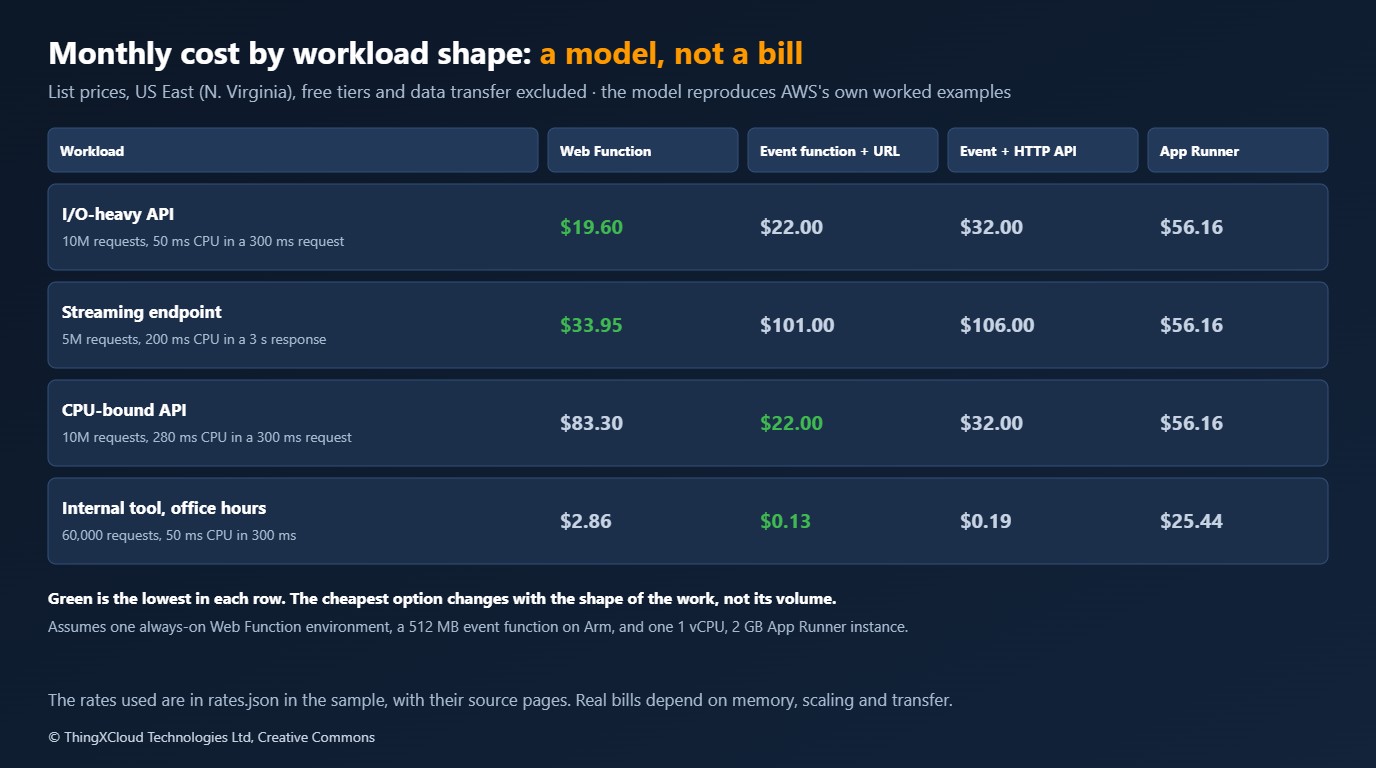
| Workload | Web Function | Event Function, function URL | Event Function, HTTP API | App Runner |
|---|---|---|---|---|
| I/O-heavy API: 10M requests, 50 ms CPU in a 300 ms request | $19.60 | $22.00 | $32.00 | $56.16 |
| Streaming endpoint: 5M requests, 200 ms CPU in a 3 s response | $33.95 | $101.00 | $106.00 | $56.16 |
| CPU-bound API: 10M requests, 280 ms CPU in a 300 ms request | $83.30 | $22.00 | $32.00 | $56.16 |
| Internal tool: 60,000 requests in office hours | $2.86 | $0.13 | $0.19 | $25.44 |
Read the table for its shape. Where requests mostly wait, the Web Function wins, and the longer they wait the wider the gap: the streaming endpoint is a third of the Event Function’s cost. Where requests mostly compute, it loses badly, because a vCPU-second is priced well above the memory-seconds an Event Function charges for the same interval. And at low traffic, an environment that stays alive charges for memory around the clock, so paying per request is cheaper by an order of magnitude; if the environment scales to zero outside office hours the model gives $1.02, still above the Event Function.
The assumptions are in the code and they matter: one always-on environment, a 512 MB Event Function on Arm, one App Runner instance of 1 vCPU and 2 GB, list prices for US East (N. Virginia), no free tier, no data transfer. The CPU-bound row is also kind to the Event Function, since 512 MB buys a fraction of a vCPU and the same work would take longer there. Change the memory figure or the number of environments and the totals move. The ordering by workload shape does not.
Against the alternatives
| Option | Advantages | Disadvantages | Fits |
|---|---|---|---|
| Web Function | Standard server code; many requests per environment; CPU-time billing; built-in endpoint and multi-Region routing | Node.js on Arm64 only at launch; your code must be safe under concurrency; memory billed while idle; new and unproven | I/O-bound web apps and APIs, server-side rendering, streamed responses |
| Event Function with a function URL | Every runtime; isolation per request; scales to zero cleanly; mature | Billed for waiting; one request per environment; HTTP is translated into events | Low or spiky traffic, CPU-bound work, anything not in Node.js |
| Event Function behind API Gateway | Request validation, throttling, usage plans, authorisers, stages | A charge per request on top; another service to configure | Public APIs that need those gateway features |
| App Runner | Any language in a container; steady performance; simple to reason about | Pays for instances by the hour whether busy or not | Steady traffic, containers you already have |
| ECS or EKS | Full control | Full responsibility | Workloads that have outgrown the others |
%%{init: {'theme':'base','themeVariables':{'primaryColor':'#FFF3E0','primaryTextColor':'#232F3E','primaryBorderColor':'#FF9900','lineColor':'#232F3E','clusterBkg':'#F8FAFC','clusterBorder':'#CBD5E1','edgeLabelBackground':'#FFFFFF','nodeTextColor':'#232F3E'}}}%%
flowchart TD
    A[HTTP workload on AWS] --> B{Written in Node.js, or willing to be?}
    B -->|No| C[Event Function or a container service]
    B -->|Yes| D{Do requests mostly wait on I/O?}
    D -->|No, they compute| E[Event Function: isolation and per-request billing suit it]
    D -->|Yes| F{Traffic for most of the day?}
    F -->|No, occasional| G[Event Function with a function URL]
    F -->|Yes| H{Code safe with many requests in one process?}
    H -->|Not yet| I[Fix shared state and blocking paths first]
    H -->|Yes| J[Web Function. Put CloudFront in front for domain and WAF]
    classDef compute fill:#FFF3E0,stroke:#FF9900,stroke-width:2px,color:#232F3E
    classDef store fill:#F0FFF4,stroke:#1D8102,stroke-width:2px,color:#145202
    classDef net fill:#EBF8FF,stroke:#0073BB,stroke-width:2px,color:#004C74
    classDef danger fill:#FEF2F2,stroke:#D13212,stroke-width:2px,color:#991B1B
    class A,B,D,F,H compute
    class C,E,G net
    class I danger
    class J store
Security and compliance
- Public by choice, not by default. An
ApplicationManagedendpoint is reachable from the internet and trusts your code to authenticate. AWS documents a condition key,lambda:Request/WebFunctionAuthType, that a service control policy can use to forbid public endpoints across an organisation. For a regulated estate, set that policy before the first team discovers the feature. - Front door. With
IamAuthand CloudFront origin access control, only your distribution can invoke the endpoint, which gives you a custom domain, TLS policy and WAF without the endpoint being callable directly. - Tenant and patient isolation. An Event Function gave you one request per environment for free. A Web Function does not. Any design that relied on that for isolation between tenants has to be re-argued.
- Region. Multi-Region deployment replicates code and configuration to every Region you list, and routes by latency. For data that must stay in the EU, list EU Regions only and check where the data stores are.
- Logs. Each environment writes a summary record every minute with request count, peak concurrency and CPU time. Keep request content out of application logs as before.
The feature is days old. Before it carries clinical or personal data, confirm it is covered by the compliance programmes your organisation relies on and by your agreement with AWS, and get an answer on isolation under multi-concurrency from whoever owns security architecture. A sensible first use is an internal, non-clinical API where the billing model can be observed on a real bill.
Operations
Three things change for the team running it. Capacity is now two numbers, requests per environment and environments per endpoint, and requests beyond either limit are rejected with HTTP 429, not queued, so clients need retry with backoff. Deployments are revisions with weighted routing, which makes a canary a routing change and a rollback the same. And the metric to watch moves from duration to CPU time per request and peak concurrency per environment: a rise in CPU per request is a rise in cost and a warning that the event loop is being held.
Key takeaways
- A Lambda Web Function is a normal HTTP server: listen on the address in
AWS_LAMBDA_HTTP_ENDPOINTwithin ten seconds, and expect about one second afterSIGTERM. At launch it is Node.js 24 on Arm64 only. - Compute is billed by CPU time. In the measurement, 1,280 requests with 275.75 seconds of total duration used 0.20 seconds of server CPU.
- CPU-bound work is the wrong fit twice over: it is priced higher than on an Event Function, and it blocks every other request in the process. A health check waited 2.91 seconds behind one hashing request.
- Memory is billed while an environment exists. For occasional traffic an Event Function behind a function URL remains far cheaper.
- Multi-concurrency removes the per-request isolation Event Functions gave for free. Check for shared state before moving a handler.
If you have a Web Function carrying real traffic, the numbers worth sharing are CPU milliseconds per request and peak concurrency per environment. Leave them in a comment.
The server passed 8 of 8 tests and the measurements above on Node.js 24.22.2 in GitHub Actions (run 43338914911); CPU time was read from the operating system for the server process alone. The cost model passed 12 of 12 checks, including the four Web Functions examples on the Lambda pricing page to within one cent. The listings are the files in the samples repository. Nothing was deployed to AWS: cold starts, scaling, the concurrency limits, endpoint authentication and real bills were not observed. Facts about the service are from the AWS announcement of 12 October and the Lambda documentation. The model uses list prices for US East (N. Virginia) from the pages named in rates.json and excludes free tiers and data transfer.
The complete sample for this article is on GitHub: nithinmohantk/blog-samples-working-repo/lambda-web-functions. Clone it with git clone https://github.com/nithinmohantk/blog-samples-working-repo.git and open the lambda-web-functions folder. Its README says how to run it and what has been verified.
Glossary
- Event Function— The original Lambda model: a handler invoked once per event, one request per execution environment.
- Web Function— A Lambda form factor in which your code is an HTTP server and one environment serves many requests.
- Execution environment— The isolated microVM in which Lambda runs your code.
- Revision— An immutable snapshot of a Web Function’s code and configuration.
- Endpoint— The HTTPS entry point of a Web Function, which routes requests to one or two revisions.
- Active CPU time— CPU seconds the process actually consumes, as opposed to elapsed time.
- Multi-concurrency— More than one request in flight in the same process at once.
- Function URL— A built-in HTTPS endpoint for an Event Function.
References & Further Reading
- → Announcing AWS Lambda Web Functions— The launch post, 12 October 2026
- → Exploring AWS Lambda Web Functions for building web applications— Architecture, concurrency settings, authentication and logging
- → AWS Lambda Web Functions documentation— Concepts, HTTP behaviour, lifecycle and scaling
- → Execution environment lifecycle— Start-up, readiness and shutdown rules
- → AWS Lambda pricing— Rates and the worked examples the model is checked against
- → AWS App Runner pricing— Rates used for the App Runner column
- → Sample code for this article— The lambda-web-functions folder on GitHub
Discover more from C4: Container, Code, Cloud & Context
Subscribe to get the latest posts sent to your email.