
On this page
Loading a large data set into a DynamoDB table that already serves traffic has never had a managed answer. Import from S3 creates a new table and cannot touch an existing one, so backfills, migrations between accounts and partial restores have run as BatchWriteItem loops in Glue, EMR, Step Functions or Lambda fleets. Those loops spend the table’s own write capacity, compete with the application for it, and need retry logic for every throttled item.
On 5 November AWS made bulk put items generally available: a managed, asynchronous job that reads DynamoDB JSON or Ion files from S3 and writes them into an existing table on capacity separate from the application’s. I loaded the same million items four ways (a BatchWriteItem loop, bulk put items in both of its performance tiers, and import from S3), then looked at time, what was billed, what the application saw, and what happens when the input is broken.
How bulk put items works
You point a StartBulkPutItems call at an S3 prefix and a table. Every object under the prefix must use the same format (line-delimited DynamoDB JSON or Amazon Ion) and the same compression (gzip, zstd or none). DynamoDB reads the objects in parallel and writes the items with dedicated capacity, so the writes do not consume the table’s provisioned or on-demand write capacity. The operation is asynchronous: you poll DescribeBulkOperation by its ARN, and it keeps running if the process that started it goes away.
%%{init: {'theme':'base','themeVariables':{'signalColor':'#0073BB','signalTextColor':'#0F172A','actorBkg':'#FFF3E0','actorBorder':'#FF9900','actorTextColor':'#232F3E','noteBkgColor':'#FFF8E7','noteBorderColor':'#FF9900','noteTextColor':'#232F3E'}}}%%
sequenceDiagram
    participant C as Loader script
    participant D as DynamoDB bulk operation
    participant S as Amazon S3
    C->>D: StartBulkPutItems (table, input prefix, report prefix, tier, ClientToken)
    D-->>C: BulkOperationArn, status IN_PROGRESS
    D->>S: Read input objects in parallel
    D->>D: Validate each record, check its condition, write table and GSIs
    C->>D: DescribeBulkOperation (poll)
    D-->>C: ProcessedItemCount, ProcessedInputBytes / TotalInputBytes
    D->>S: Error and condition-failure reports, manifest
    D-->>C: COMPLETED, COMPLETED_WITH_ERRORS or FAILED, with BulkOperationUsage
Each line is one record: an Item in DynamoDB JSON and, optionally, a ConditionExpression with its attribute names and values. Without a condition the item overwrites any existing item with the same key. attribute_not_exists(pk) makes a record insert-only, and a version guard such as attribute_not_exists(#v) OR #v < :new lets a re-run write only newer data. The same files, without conditions, are valid input for import from S3.
{"Item":{"pk":{"S":"order#000000042"},"category":{"S":"cat-02"},"version":{"N":"1"},"amount":{"N":"412.80"},"status":{"S":"PACKED"},"note":{"S":"..."}}}
{"Item":{"pk":{"S":"order#000000043"},"category":{"S":"cat-03"},"version":{"N":"1"},"amount":{"N":"86.15"},"status":{"S":"NEW"},"note":{"S":"..."}},"ConditionExpression":"attribute_not_exists(pk)"}| Setting | What it does |
|---|---|
PerformanceTier | STANDARD (default, for background loads) or ACCELERATED (finishes faster at a higher rate). |
MaxWriteRequestUnits | Caps the operation’s write rate (at least 1,024 per second) without changing the table’s capacity settings. |
ClientToken | Makes the start idempotent for 8 hours: a retried call with the same token and parameters returns the same operation. |
OutputS3Configuration.OutputType | ERROR, CONDITION_CHECK_FAILURE or both: which records go to the S3 report. The output location is mandatory. |
Two prerequisites matter for scheduling: only one bulk operation can run on a table at a time, and none can start while an index is being created on it. Input objects must not change while the operation runs.
The test
One million synthetic order items of about 1 KB each, in 16 gzip files (111 MB compressed, 953 MB uncompressed), and a table with one keys-only global secondary index on category. Everything ran from AWS CloudShell in eu-west-1 against on-demand tables. The BatchWriteItem baseline used 16 threads, 25 items per call, and retried unprocessed items with full-jitter backoff:
"""The do-it-yourself baseline: BatchWriteItem in parallel, with unprocessed items retried.

BatchWriteItem takes up to 25 puts per call. Throttled items come back in
UnprocessedItems rather than as an error, so they must be resent with backoff.
"""
from __future__ import annotations

import random
import threading
import time
from concurrent.futures import ThreadPoolExecutor
from dataclasses import dataclass, field
from pathlib import Path
from typing import Iterable

from botocore.exceptions import ClientError

from .common import client
from .data import read_items

BATCH = 25
MAX_RETRIES = 12


@dataclass
class Stats:
    items: int = 0
    calls: int = 0
    write_units: float = 0.0
    unprocessed_retries: int = 0
    throttle_errors: int = 0
    lock: threading.Lock = field(default_factory=threading.Lock, repr=False)

    def add(self, **kw) -> None:
        with self.lock:
            for k, v in kw.items():
                setattr(self, k, getattr(self, k) + v)


def backoff(attempt: int, base: float = 0.05, cap: float = 5.0) -> float:
    """Full jitter: a random wait up to an exponentially growing ceiling."""
    return random.uniform(0, min(cap, base * 2 ** attempt))


def write_batch(table: str, items: list[dict], stats: Stats, ddb=None) -> None:
    ddb = ddb or client("dynamodb")
    requests = [{"PutRequest": {"Item": it}} for it in items]
    attempt = 0
    while requests:
        try:
            resp = ddb.batch_write_item(RequestItems={table: requests}, ReturnConsumedCapacity="TOTAL")
        except ClientError as err:
            code = err.response["Error"]["Code"]
            if code not in ("ProvisionedThroughputExceededException", "ThrottlingException",
                            "RequestLimitExceeded") or attempt >= MAX_RETRIES:
                raise
            stats.add(throttle_errors=1)
            time.sleep(backoff(attempt))
            attempt += 1
            continue
        stats.add(calls=1, write_units=sum(c.get("CapacityUnits", 0) for c in resp.get("ConsumedCapacity", [])))
        unprocessed = resp.get("UnprocessedItems", {}).get(table, [])
        stats.add(items=len(requests) - len(unprocessed))
        if unprocessed:
            if attempt >= MAX_RETRIES:
                raise RuntimeError(f"{len(unprocessed)} items still unprocessed after {MAX_RETRIES} retries")
            stats.add(unprocessed_retries=1)
            time.sleep(backoff(attempt))
            attempt += 1
        requests = unprocessed


def chunks(items: Iterable[dict], size: int = BATCH):
    batch: list[dict] = []
    for it in items:
        batch.append(it)
        if len(batch) == size:
            yield batch
            batch = []
    if batch:
        yield batch


def load(table: str, files: list[Path], workers: int = 16) -> Stats:
    stats = Stats()

    def one_file(path: Path) -> None:
        for batch in chunks(read_items(path)):
            write_batch(table, batch, stats)

    # One thread per file at a time; files are similar in size, so the load stays even.
    with ThreadPoolExecutor(max_workers=workers) as pool:
        for future in [pool.submit(one_file, f) for f in files]:
            future.result()
    return stats
The bulk put side starts the operation with a client token, polls until a terminal state, and keeps the usage figures that billing is based on:
"""Start a bulk put items operation, wait for it, and keep what describe-bulk-operation says."""
from __future__ import annotations

import time
import uuid

from .common import bucket, client

TERMINAL = {"COMPLETED", "COMPLETED_WITH_ERRORS", "CANCELLED", "FAILED"}


def start(table: str, prefix: str, tier: str = "STANDARD", report_prefix: str | None = None,
          max_wru: int | None = None, token: str | None = None) -> str:
    params = {
        "TableName": table,
        "InputS3Configuration": {"S3Bucket": bucket(), "S3KeyPrefix": prefix,
                                 "InputFormat": "DYNAMODB_JSON", "InputCompressionType": "GZIP"},
        "OutputS3Configuration": {"S3Bucket": bucket(), "S3KeyPrefix": report_prefix or f"reports/{table}/",
                                  "OutputType": ["ERROR", "CONDITION_CHECK_FAILURE"]},
        "PerformanceTier": tier,
        # Idempotent start: a retried call with the same token returns the same operation.
        "ClientToken": token or f"{table}-{uuid.uuid4()}",
    }
    if max_wru:
        params["MaxWriteRequestUnits"] = max_wru
    resp = client("dynamodb").start_bulk_put_items(**params)
    return resp["BulkOperationDescription"]["BulkOperationArn"]


def wait(arn: str, poll: float = 15.0, timeout: float = 4 * 3600, on_poll=None) -> dict:
    """Poll until a terminal state. Counters are periodic snapshots, not live values."""
    ddb = client("dynamodb")
    deadline = time.monotonic() + timeout
    history = []
    while True:
        desc = ddb.describe_bulk_operation(BulkOperationArn=arn)["BulkOperationDescription"]
        snap = {"t": time.time(), "status": desc["BulkOperationStatus"],
                "processed_items": desc.get("ProcessedItemCount"),
                "processed_bytes": desc.get("ProcessedInputBytes"),
                "total_bytes": desc.get("TotalInputBytes")}
        history.append(snap)
        if on_poll:
            on_poll(snap)
        if desc["BulkOperationStatus"] in TERMINAL:
            desc["PollHistory"] = history
            return desc
        if time.monotonic() > deadline:
            raise TimeoutError(f"{arn} still {desc['BulkOperationStatus']} after {timeout} s")
        time.sleep(poll)


def billed_bytes(desc: dict) -> dict:
    """Bytes DynamoDB metered for the table and each index (the basis of the per-GB charge)."""
    out = {}
    for usage in desc.get("BulkOperationUsage", []):
        out["table"] = usage.get("Table", {}).get("BulkPutBytes", 0)
        for name, gsi in (usage.get("GlobalSecondaryIndexes") or {}).items():
            out[f"gsi:{name}"] = gsi.get("BulkPutBytes", 0)
    return out
Results
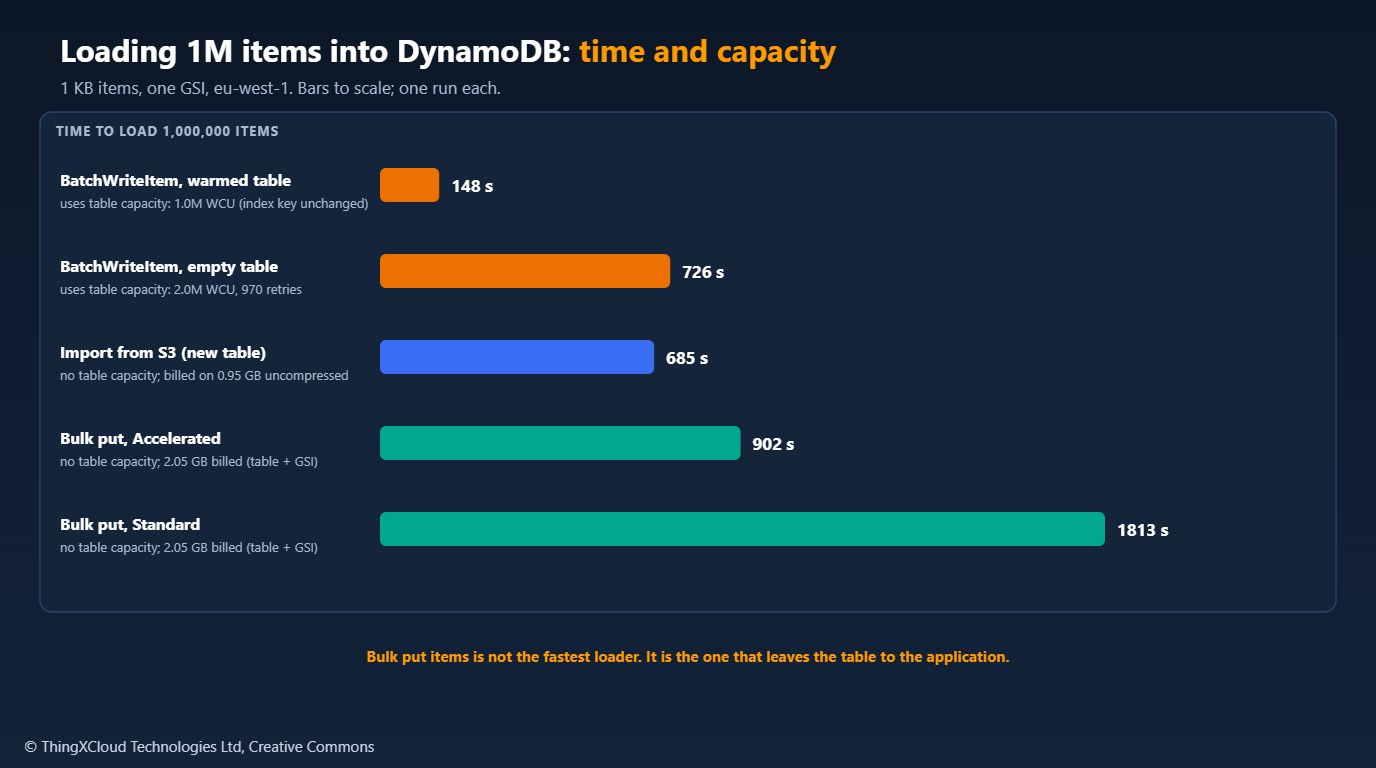
| Method | Target | Time | Capacity used, billing basis |
|---|---|---|---|
| BatchWriteItem, 16 threads | Empty on-demand table | 725.5 s | 2,000,000 write units (table and GSI); 970 retries of unprocessed items |
| BatchWriteItem, 16 threads | Same table, identical items again | 148.1 s | 1,000,000 write units (GSI unchanged); no retries |
| Bulk put items, Standard | Empty table | 1,812.5 s | None of the table’s capacity; 1,024,000,000 bytes table + 1,024,000,000 bytes GSI |
| Bulk put items, Standard | Same table, identical items, application running | 751.6 s | None; 1,024,000,000 bytes table, 0 bytes GSI |
| Bulk put items, Accelerated | Empty table | 901.5 s | None; 1,024,000,000 bytes table + 1,024,000,000 bytes GSI |
| Import from S3 | New table | 685.3 s | None; 952,835,854 bytes (uncompressed input) |
The first run stopped when CloudShell closed an idle session during the Standard load. That operation finished on its own and was collected later by its ARN. The second run reused the tables, so its BatchWriteItem and Standard loads rewrote identical items. Writing into an empty table and overwriting a loaded one turned out to behave differently, so the table shows both. Each figure comes from one run.
Bulk put items is not the fastest way to load data
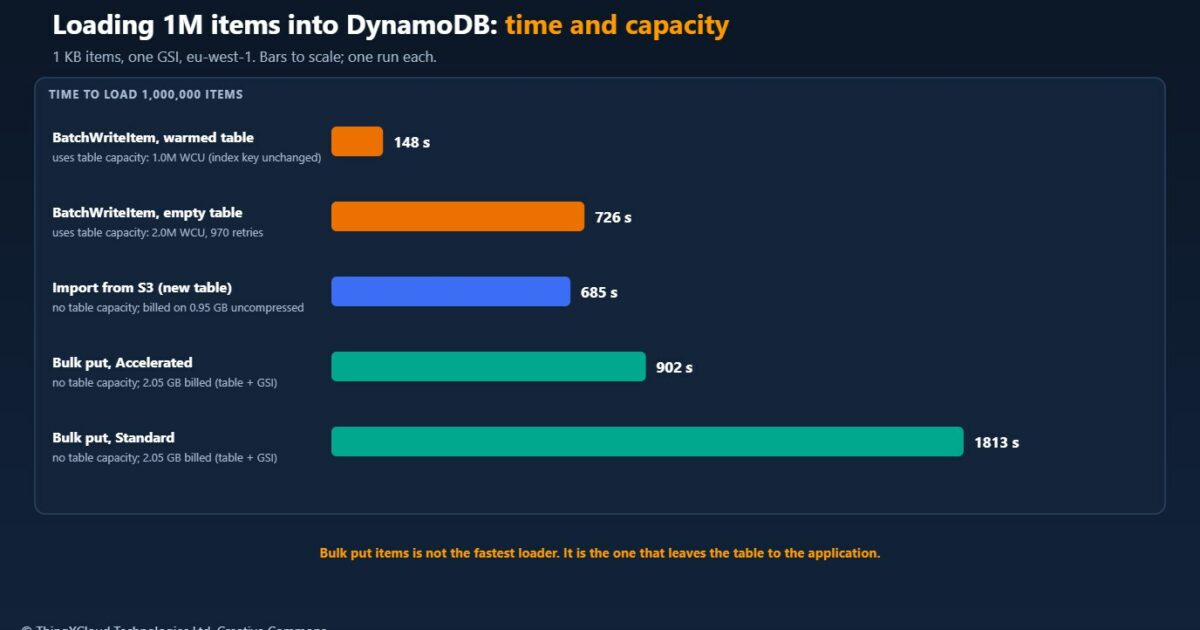
On a warmed table the BatchWriteItem loop finished in under two and a half minutes, five times faster than the Standard overwrite. Even on an empty table, where DynamoDB returned 970 batches with unprocessed items while it scaled the new on-demand table, the loop finished in less than half the Standard tier’s time. Accelerated halved Standard’s time on an empty table, and import from S3, which builds a new table, was the quickest of the managed options. Pick bulk put items for what it does not take from the table, not for speed, and pick the tier by deadline.
It leaves the table’s capacity to the application
CloudWatch showed zero consumed write capacity on the table during the Accelerated load and on the imported table. During the Standard overwrite, the only consumed writes (2,363) were the application thread’s own. That thread ran PutItem and GetItem against the table before, during and after the import, with SDK retries off so throttling would show as errors: there were none, and median latency stayed at 5.6 ms for writes and 4.1 to 4.6 ms for reads. The thread itself was slowed by recurring one-second stalls on the CloudShell side, present before the import started, so its 99th percentile reflects the client, not DynamoDB.
Writing a million items into a freshly created on-demand table, the loop got 970 partial batches back and took 726 s. The same load on the table once it had scaled took 148 s with no retries. If you keep BatchWriteItem for loads, keep the unprocessed-item handling, and for a one-off load into a new table consider warm throughput or a managed import instead of a bigger client fleet.
What you pay for
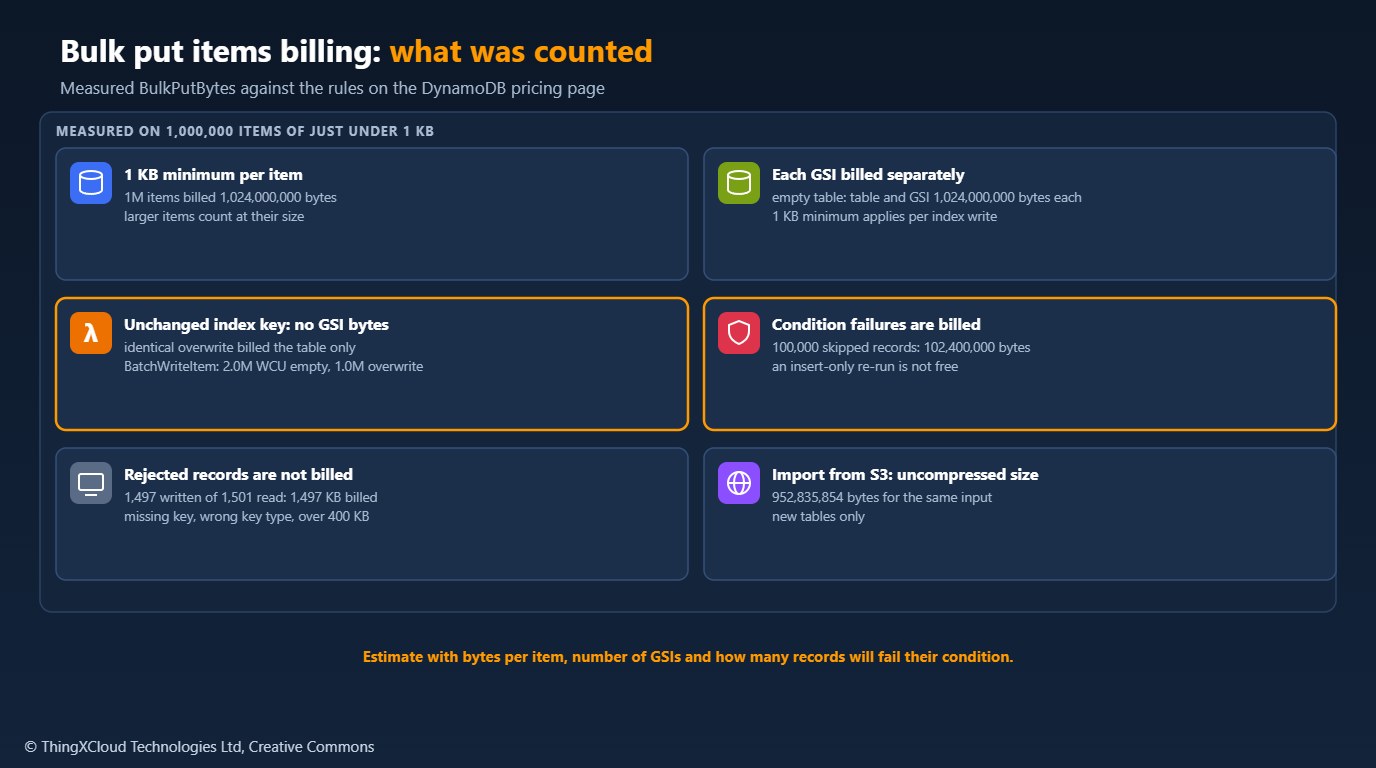
Bulk put items is billed per byte written, at a rate that depends on the tier and the table class. Each item counts at least 1 KB, larger items count at their size, and every index write is counted separately with its own 1 KB minimum. The run matched that exactly:
- One million items under 1 KB were billed as 1,024,000,000 bytes for the table, 1 KB each, and the same again for the GSI on an empty table.
- The overwrite billed no GSI bytes. The items were identical, so the index key did not change and DynamoDB did not write the index. BatchWriteItem behaved the same way: 2,000,000 write units into the empty table, 1,000,000 for the identical overwrite.
- Condition failures are billed. Re-running 100,000 items with
attribute_not_exists(pk)wrote nothing and was billed 102,400,000 bytes. An insert-only re-run of a large file is not free. - Rejected records are not billed. In the error run, 1,497 items were written and exactly 1,497 KB were billed per target; the four rejected records cost nothing.
- Import from S3 is billed on the uncompressed input size, 0.95 GB here, and only works for a new table.
For a like-for-like estimate, compare write request units for the loop (two per item here, one for the table and one for the index) with bulk-put gigabytes (two per million 1 KB items), at the rates on the DynamoDB pricing page for your Region and tier.
When the input is broken
The error run used two files: 1,000 records with three planted problems (no partition key, a numeric key on a string-keyed table, an item over 400 KB), and 1,000 records with a broken JSON line in the middle. The report and the manifest in S3 showed two kinds of failure:
itemIndex 100  One or more parameter values were invalid: Missing the key pk in the item
itemIndex 400  One or more parameter values were invalid: Type mismatch for key pk expected: S actual: N
itemIndex 700  Item size has exceeded the maximum allowed size
truncated.json.gz (no itemIndex)  Unexpected token. Remainder of the file will not be processed.

manifest: good-with-bad-records.json.gz  FULLY_PROCESSED      processedRanges [[0,999]]
          truncated.json.gz              PARTIALLY_PROCESSED  processedRanges [[0,499]]
Record-level problems were reported with their line number and the rest of the file was loaded. The broken line stopped its file after 500 records, and because DynamoDB could not confirm it had read every byte of the input, the whole operation ended FAILED with ValidationException, even though 1,497 items had been written. Treat FAILED as “some data may have been written”: read the manifest’s processedRanges, fix the file, and re-run with a condition or version guard so the items already written are skipped.
Condition-failure reports hold the full new and existing item for every skipped record; the 100,000-record re-run produced 32 MB of them. Put the report prefix under the same encryption, access control and retention rules as the table, or request only ERROR output when the data is sensitive.
Running it in production
- Start idempotently and record the ARN. A
ClientTokenmakes retries safe for 8 hours, and the ARN is all you need to find the operation again; in this test the job survived its shell closing twice. - Poll gently. Progress counters arrived in steps about a minute apart, and
TotalInputBytesappeared only after the input was validated. - One operation per table. Queue loads per table, and do not schedule them while an index is being added.
- Make re-runs safe. Use a version attribute and
attribute_not_exists(#v) OR #v < :new, remembering that skipped records are still billed. - Check the outcome, not just the status. Compare
ProcessedItemCount,FailedItemCountand the manifest with what you expected, and alert onCOMPLETED_WITH_ERRORSas well asFAILED. - Size files evenly. The operation reads objects in parallel; sixteen similar files kept progress even.
Which loader to use
| Situation | Use |
|---|---|
| Load into a table that is serving traffic | Bulk put items; Standard if hours are fine, Accelerated for a deadline |
| Seed a new table | Import from S3: fastest managed option here, no table capacity used |
| Small or continuous writes, or logic per item | BatchWriteItem or PutItem from your own code |
| Fastest possible one-off load and the table is idle | A parallel BatchWriteItem loop, with unprocessed-item retries and warm throughput for a new table |
| Re-runnable sync between accounts or Regions | Bulk put items with version-guard conditions |
This article continues the DynamoDB thread on this blog: see multi-Region active-active with global tables and Aurora DSQL vs DynamoDB global tables.
Key takeaways
- Bulk put items loads S3 data into an existing DynamoDB table without using the table’s write capacity; the application saw no errors and no change in median latency.
- It is not the fastest loader: 1M items took 1,812 s on Standard and 902 s on Accelerated, against 148 to 726 s for a 16-thread BatchWriteItem loop.
- Billing is per byte with a 1 KB minimum per item and per index write; overwrites that leave index keys unchanged write no index bytes.
- Records that fail their condition are billed; records rejected by validation are not.
- One broken line fails the whole operation after writing everything it could, so make re-runs safe with conditions and read the manifest.
Where would you use it first: a backfill, a cross-account migration or a scheduled sync? Let me know in the comments.
Everything ran from AWS CloudShell in eu-west-1 with boto3 1.44.12, against on-demand tables with one keys-only GSI. Times are service times from DescribeBulkOperation and DescribeImport, or wall time where the run measured it; capacity figures come from CloudWatch ConsumedWriteCapacityUnits and from ReturnConsumedCapacity. Each configuration was run once, so treat the times as one data point each. The application-traffic thread was slowed by client-side stalls, so it supports “no errors, no median change” and nothing finer. No per-GB prices are quoted because the pricing page did not show Regional rates; check it for your Region. All tables, the bucket and the budget alert were deleted afterwards.
Glossary
- Bulk put items
- A managed, asynchronous DynamoDB operation that writes items from S3 files into an existing table on capacity separate from the table’s.
- Bulk operation
- One StartBulkPutItems job, identified by its ARN and tracked with DescribeBulkOperation.
- Performance tier
- STANDARD or ACCELERATED: how fast the operation runs and the rate it is billed at.
- BulkPutBytes
- Bytes an operation is billed for, reported separately for the table and each GSI.
- BatchWriteItem
- The DynamoDB API that writes or deletes up to 25 items per call, using the table’s write capacity.
- UnprocessedItems
- Items a BatchWriteItem call did not write, usually because of throttling, which the caller must resend.
- Import from S3
- ImportTable: loads S3 data into a new table it creates.
- Condition expression
- A per-record test that must be true for the write to happen, such as attribute_not_exists(pk).
- Manifest
- The file a bulk operation writes to S3 that lists each input object, its processing status and the record ranges processed.
- Write request unit
- The on-demand unit for writes: one write of up to 1 KB.
The complete sample for this article is on GitHub: nithinmohantk/blog-samples-working-repo/ddb-bulk-put-items. Clone it with git clone https://github.com/nithinmohantk/blog-samples-working-repo.git and open the ddb-bulk-put-items folder. Its README says how to run it and what has been verified.
References & Further Reading
- → Introducing bulk put items for Amazon DynamoDB— AWS Database Blog launch post
- → DynamoDB JSON input format for bulk put items— Record format, conditions, validation errors
- → Requesting a bulk put items operation— Start and describe, output types, prerequisites
- → StartBulkPutItems API reference— Parameters, tiers, MaxWriteRequestUnits, ClientToken
- → Amazon DynamoDB on-demand pricing— Bulk put items and import billing rules
- → Sample code for this article— Loader, tests and results
Discover more from C4: Container, Code, Cloud & Context
Subscribe to get the latest posts sent to your email.
