
On this page
C# 8.0 brings a change to something that has been fixed since the first version of the language: an interface can now give a method a body. A class that implements the interface and says nothing about that method gets the body from the interface. A class that wants its own version writes one, as before.
Until now every member of an interface had to be implemented by every class that implemented it. This post shows how to try the new behaviour with the first previews, what the rules are when you call such a method, and where it is useful.
The problem
An interface is a promise, and once other people have written classes against it the promise is hard to change. Add one method to a published interface and every implementing class stops compiling until somebody adds that method. For a library with users you have never met, that is a breaking change.
The usual ways around it all cost something. An abstract base class can carry shared code, but a class has only one base class. Extension methods can add behaviour, but an implementer cannot replace them with something better. A second interface, the familiar IThing2, works and leaves the mess in the type names for good.
A default implementation answers this directly. The new method arrives with a body, existing implementers keep compiling, and any class that can do better overrides it.
When will we get C# 8.0?
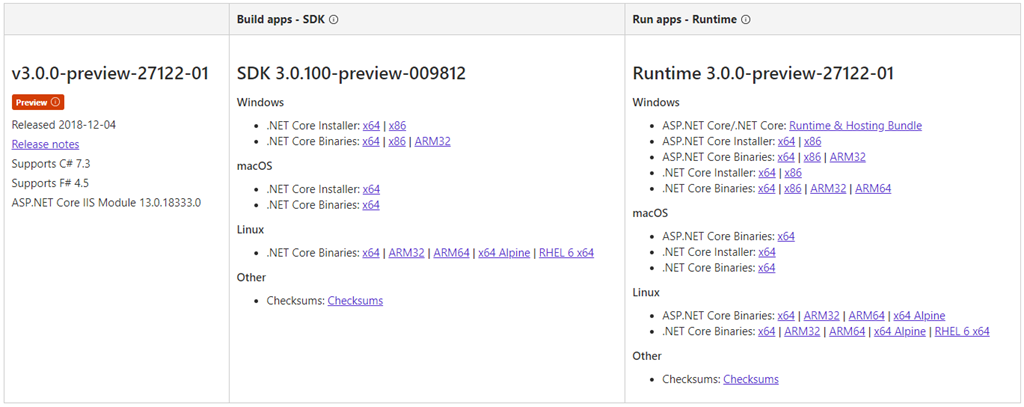
C# 8.0 is planned to ship along with .NET Core 3.0. Preview 1 of both .NET Core 3.0 and Visual Studio 2019 is available to try now.
One thing is different about this feature. Most language features are the compiler’s work alone and run on any runtime. A method body in an interface needs the runtime to cooperate, so it depends on the platform. Microsoft has said that C# 8.0 will be supported on platforms that implement .NET Standard 2.1, that .NET Core 3.0 will be one of them, and that .NET Framework 4.8 will not. If your code has to run on .NET Framework, this feature is not coming to it.
Setup
1. Download and install Preview 1 of .NET Core 3.0 and Preview 1 of Visual Studio 2019.


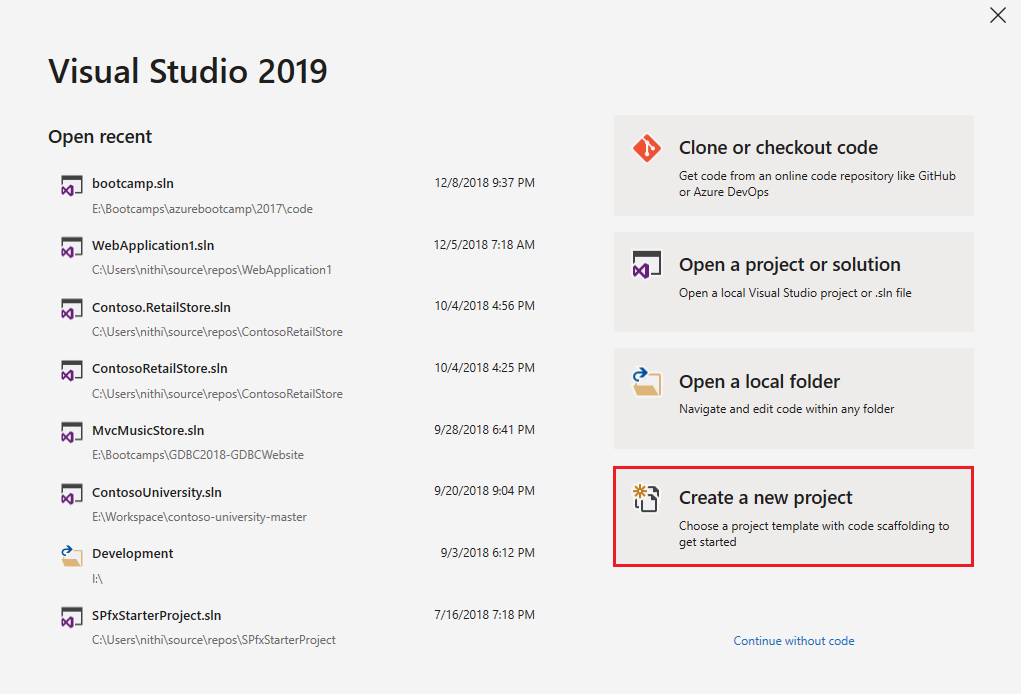
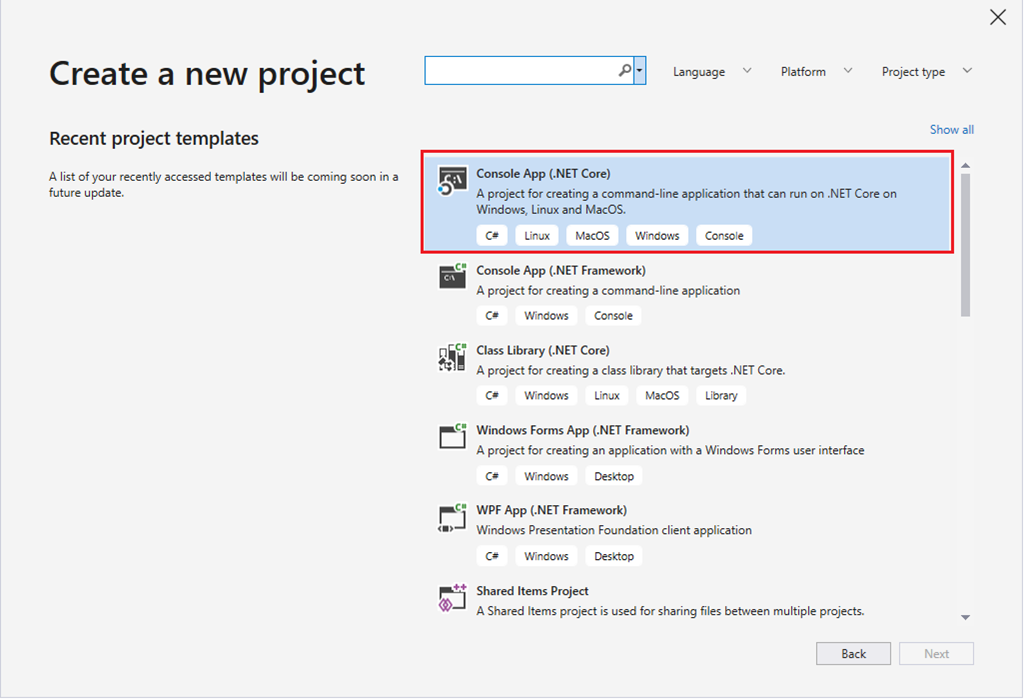
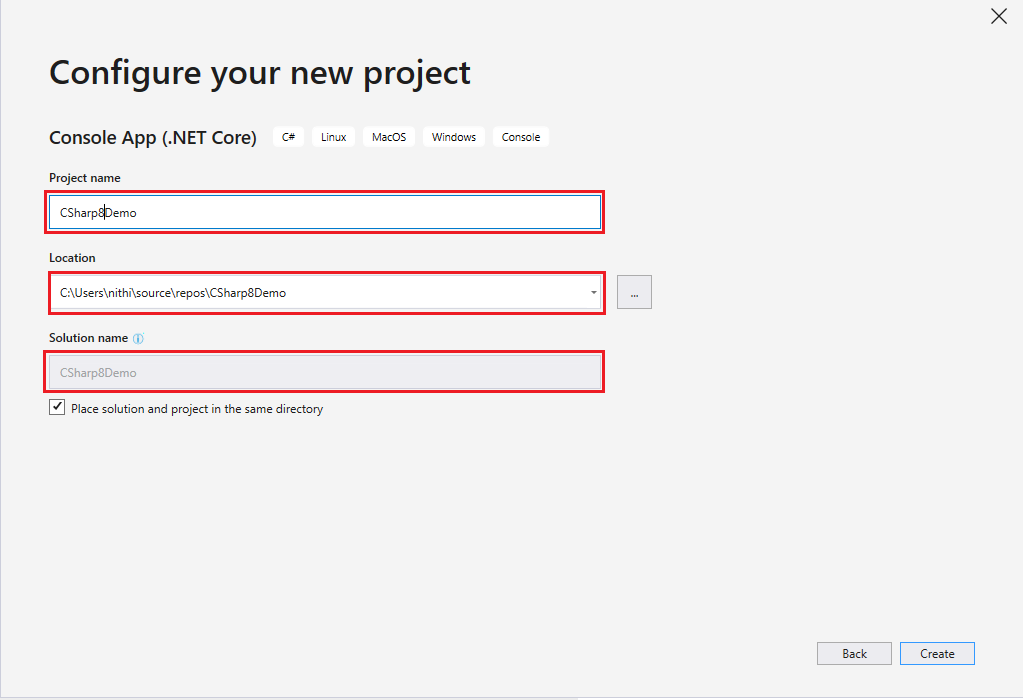
2. Start Visual Studio 2019 Preview, create a new project and choose “Console App (.NET Core)” as the project type.
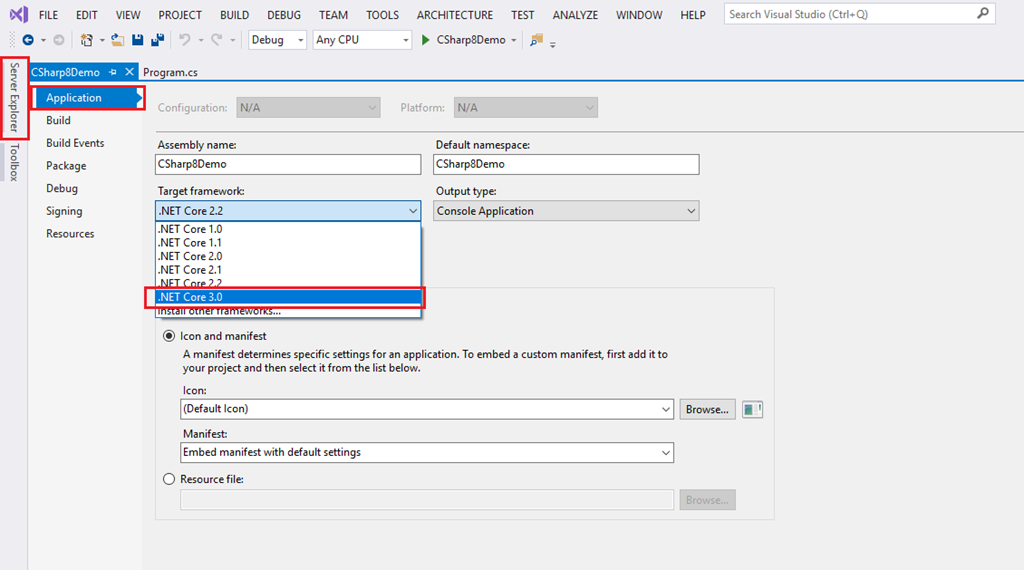
3. When the project is open, change its target framework to .NET Core 3.0. Right-click the project in Solution Explorer, choose Properties, and use the drop-down on the Application tab.
The project also has to compile as C# 8.0. If the compiler is on an older language version it refuses the method body with this error:
error CS8370: Feature 'default interface implementation' is not available in C# 7.3. Please use language version 8.0 or greater.Setting <LangVersion>8.0</LangVersion> in the project file fixes that.
The example
The interface below has two methods. DisplayMessage has no body, so every class must implement it. DefaultMessage has one. Bmw leaves it alone. Audi supplies its own.
using System;

namespace CSharp8Demo
{
    class Program
    {
        static void Main(string[] args)
        {
            IVehicle bmw = new Bmw();
            bmw.DisplayMessage();
            bmw.DefaultMessage();

            IVehicle audi = new Audi();
            audi.DisplayMessage();
            audi.DefaultMessage();
        }
    }

    interface IVehicle
    {
        // No body: every implementing class must provide this one.
        void DisplayMessage();

        // A body: classes that say nothing about this method get this implementation.
        void DefaultMessage() { Console.WriteLine("I am inside the default method in the interface!"); }
    }

    public class Bmw : IVehicle
    {
        public void DisplayMessage()
        {
            Console.WriteLine("I am BMW!!!");
        }
    }

    public class Audi : IVehicle
    {
        public void DisplayMessage()
        {
            Console.WriteLine("I am AUDI!!!");
        }

        public void DefaultMessage() => Console.WriteLine("I am inside the Audi class!");
    }
}
This is what it prints:
I am BMW!!!
I am inside the default method in the interface!
I am AUDI!!!
I am inside the Audi class!
The BMW gets the interface’s body. The Audi gets its own, even though the variable is typed as IVehicle: the call goes to the most specific implementation the object has.
Calling a default method
There is one rule that surprises people. Notice that the example declares its variables as IVehicle, not as Bmw. That is not style. A default method belongs to the interface, and a class that does not implement it does not have it as a member. This does not compile:
class Bmw : IVehicle { }

class Program
{
    static void Main()
    {
        Bmw bmw = new Bmw();
        bmw.DefaultMessage();   // the variable is a Bmw, and Bmw has no such member
    }
}error CS1061: 'Bmw' does not contain a definition for 'DefaultMessage' and no accessible extension method 'DefaultMessage' accepting a first argument of type 'Bmw' could be found (are you missing a using directive or an assembly reference?)Assign the object to an IVehicle variable, or cast it, and the call works. In practice this matters less than it sounds, because code that depends on an interface usually holds the interface type anyway. It does mean a default method is not a way to give a class new public members.
Adding a method to a published interface
This is the case the feature was designed for. An interface already has implementers, and a later version needs one more method. ConsoleLogger below was written against the first version and has not been touched. TaggedLogger was written later and has its own way to report an error.
    // Version 2 of an interface that other teams already implement.
    // LogError is new. It has a body, so version 1 implementers keep compiling.
    public interface ILogger
    {
        void Log(string message);

        void LogError(Exception error) => Log("ERROR " + error.GetType().Name + ": " + error.Message);
    }

    // Written against version 1. Not touched since.
    public class ConsoleLogger : ILogger
    {
        public void Log(string message) => Console.WriteLine(message);
    }

    // Written against version 2, with its own idea of how to report an error.
    public class TaggedLogger : ILogger
    {
        public void Log(string message) => Console.WriteLine("[app] " + message);

        public void LogError(Exception error) => Console.WriteLine("[app] !! " + error.Message);
}starting
ERROR InvalidOperationException: the order was already shipped
[app] starting
[app] !! the order was already shippedThe old class reports the error through the default body, which is written in terms of the one method the old class does have. That is the pattern to copy: a default implementation should be built from the interface’s other members, because those are all it can rely on. An interface still has no instance fields, so a default method cannot keep state of its own.
When two defaults collide
A class can implement many interfaces, so two of them can disagree. Here IElectric and ILuxury both replace the default that IVehicle provides, and Car implements both without choosing.
interface IVehicle { void Describe() { Console.WriteLine("a vehicle"); } }
interface IElectric : IVehicle { void IVehicle.Describe() { Console.WriteLine("an electric vehicle"); } }
interface ILuxury : IVehicle { void IVehicle.Describe() { Console.WriteLine("a luxury vehicle"); } }

class Car : IElectric, ILuxury { }   // which Describe does a Car get?
The compiler does not guess. It stops:
error CS8705: Interface member 'IVehicle.Describe()' does not have a most specific implementation. Neither 'IElectric.IVehicle.Describe()', nor 'ILuxury.IVehicle.Describe()' are most specific.The fix is for the class to say what it wants. With a Describe method on Car, the program compiles, and each object gets the most specific body available to it:
class Bike : IVehicle { }
class Leaf : IElectric { }
class Car : IElectric, ILuxury
{
    public void Describe() { Console.WriteLine("an electric luxury car"); }   // the class settles it
}a vehicle
an electric vehicle
an electric luxury car%%{init: {'theme':'base','themeVariables':{'primaryColor':'#FFF3E0','primaryTextColor':'#232F3E','primaryBorderColor':'#FF9900','lineColor':'#232F3E','clusterBkg':'#F8FAFC','clusterBorder':'#CBD5E1','edgeLabelBackground':'#FFFFFF','nodeTextColor':'#232F3E'}}}%%
flowchart TD
A["A call through the interface type"] --> B{"Does the class implement the method?"}
B -- Yes --> C["The class's method runs"]
B -- No --> D{"Does one interface give the most specific body?"}
D -- Yes --> E["That interface's body runs"]
D -- "No, two disagree" --> F["Compile error CS8705:
the class must choose"]
style C fill:#F0FFF4,stroke:#1D8102,stroke-width:2px,color:#145202
style E fill:#F0FFF4,stroke:#1D8102,stroke-width:2px,color:#145202
style F fill:#FEF2F2,stroke:#D13212,stroke-width:2px,color:#991B1BWhen to use it
| Situation | Use a default implementation? | Why |
|---|---|---|
| Adding a member to an interface others already implement | Yes | Existing classes keep compiling, new ones can override |
| A convenience method built from the interface’s other members | Yes | One place for the logic, and implementers can still do better |
| Shared behaviour that needs fields | No, use an abstract base class | An interface has no instance state |
| Giving classes new public members | No | The method is reachable only through the interface type |
| Code that must run on .NET Framework | No | The runtime support is not planned there |
Used with restraint this makes interfaces easier to live with over years. Used freely it turns an interface into a base class with worse tooling. My own rule will be to reach for it when an interface has to grow, and not when a new one is being designed.
Key takeaways
- In C# 8.0 an interface method can have a body. Classes that do not implement the method get that body.
- A class’s own implementation always wins over the interface’s.
- A default method is called through the interface type. Calling it on a variable of the class type is compile error CS1061.
- If two interfaces supply competing bodies, the compiler reports CS8705 and the class has to implement the method itself.
- The feature needs runtime support: .NET Core 3.0, and not .NET Framework 4.8.
- Its best use is adding a member to an interface that already has implementers.
Every listing in this post was compiled with the language version set to 8.0 and run, and the outputs and compiler errors are copied from that run: GitHub Actions run 44552918548, commit ccbb0d9. Three of the six projects are expected not to compile, and the run checks that each fails with exactly the error shown. The screenshots are from my own installation of the previews and that installation was not repeated for the run. The statement about .NET Framework 4.8 is from Microsoft’s “Building C# 8.0” post and was not tested here.
The complete sample for this article is on GitHub: nithinmohantk/blog-samples-working-repo/csharp8-default-interface-methods. Clone it with git clone https://github.com/nithinmohantk/blog-samples-working-repo.git and open the csharp8-default-interface-methods folder. Its README says how to run it and what has been verified.
References & Further Reading
- → Building C# 8.0— Mads Torgersen on the planned features, including default implementations of interface members and platform support
- → Sample code for this article— Two programs and four experiments, all compiled as C# 8.0
Discover more from C4: Container, Code, Cloud & Context
Subscribe to get the latest posts sent to your email.
