Following the AWS re:Invent 2024 keynote online, Werner Vogels’s announcement of Amazon Aurora DSQL was the one that made me pause, rewind, and watch again. The claim — a PostgreSQL-compatible, distributed SQL database with active-active multi-region writes, no application-side conflict resolution code, and a scale-to-zero pricing model — was either a genuine architectural leap or the most ambitious marketing slide of the year. Fifteen months later, Aurora DSQL has moved through preview, reached general availability, and accumulated enough real-world adoption that a practitioner assessment is now possible. This article is that assessment: what DSQL actually is under the hood, what it delivers in production, where it has real limits that the launch deck glossed over, and the architecture decisions that will determine whether it belongs in your stack or not.
The short answer, for architects pressed for time: Aurora DSQL is genuinely novel for a specific class of workload — globally distributed, write-heavy, latency-sensitive SaaS applications that need true multi-region active-active writes without the coordination overhead of XA transactions or the operational burden of managing Vitess or CockroachDB clusters. For everything else, the existing Aurora Serverless v2 with Global Database remains the more mature, better-documented, lower-risk choice.
What Aurora DSQL Actually Is: Beyond the Marketing Slide
Aurora DSQL is not simply Aurora with replication bolted across regions. It is a purpose-built distributed database engine built on a fundamentally different transaction processing architecture from classic Aurora. Understanding the distinction matters because it explains both why certain things are fast and why certain familiar PostgreSQL features are absent.
Classic relational databases, including Aurora PostgreSQL, use pessimistic concurrency control: when a transaction wants to modify a row, it acquires a lock on that row, preventing other transactions from writing to it until the first commits. This works excellently on a single node or within a region. Across regions, lock acquisition requires cross-region round trips, which immediately imposes 50-200ms of latency per write depending on region pair distance. You either accept that latency or you designate one region as the primary writer — which is what Aurora Global Database does.
Aurora DSQL uses Optimistic Concurrency Control (OCC) instead. Transactions proceed without acquiring locks. Each transaction reads data, performs its computation, and only at commit time does the system check whether any conflicting write occurred to the same rows during the transaction’s lifetime. If no conflict is detected, the transaction commits across all regions simultaneously using a distributed consensus protocol. If a conflict is detected, the transaction is retried — automatically, transparently, from the application’s perspective.
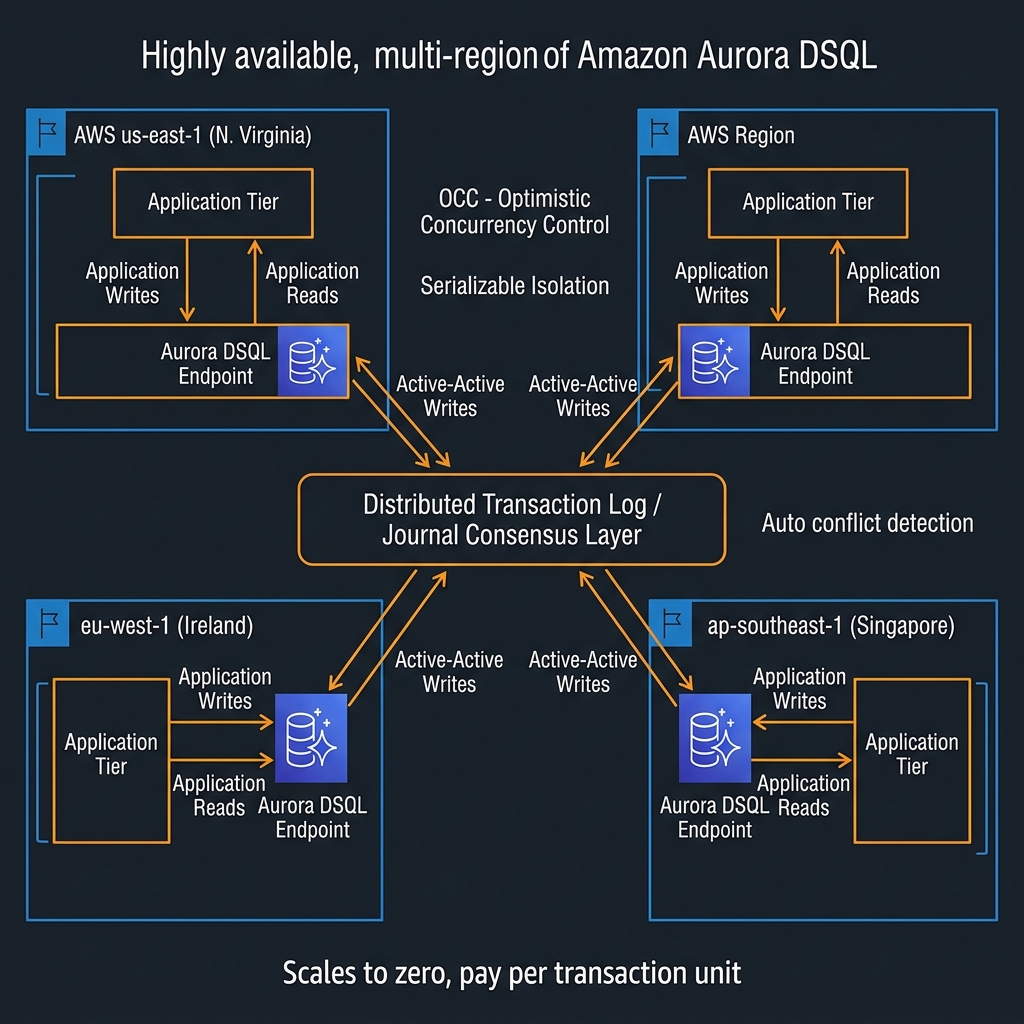
What DSQL Is Not: Capability Gaps That Matter
The feature surface of Aurora DSQL, as of early 2026, is a reduced subset of standard PostgreSQL. This is important to evaluate explicitly before committing to a migration:
Not supported: Stored procedures and PL/pgSQL functions. Triggers. Foreign keys across tables (foreign keys within a single table are supported in some configurations). Sequences with guaranteed global ordering. SERIAL and BIGSERIAL column types (use gen_random_uuid() for primary keys instead — DSQL is UUID-native). LISTEN/NOTIFY. Long-running transactions beyond a configurable timeout. SELECT FOR UPDATE (lock-based row reservation — conceptually incompatible with OCC).
This list has shortened considerably since the December 2024 preview. Stored procedures in particular were a frequently cited blocker, and AWS has indicated they are on the roadmap. But as of today, if your application relies heavily on triggers, stored procedures, or SELECT FOR UPDATE patterns for inventory management or seat reservation, DSQL is not yet the right choice.
SELECT routine_name, routine_type FROM information_schema.routines WHERE routine_schema = 'public' for procedures/functions, and SELECT trigger_name, event_object_table FROM information_schema.triggers for triggers. If either returns rows, those are active blockers requiring remediation before DSQL is viable.The Transaction Model: How DSQL Achieves Global Serialisability
Understanding how DSQL commits transactions is not just academic — it directly informs how you architect your application’s retry logic and how you interpret latency metrics in production.
DSQL uses a globally consistent logical timestamp system. Every transaction is assigned a timestamp at start. At commit time, the system compares the transaction’s read set (the rows it read during execution) against any writes that occurred to those rows after the transaction’s start timestamp. If no overlap exists, the transaction receives a commit timestamp and its writes are applied atomically across all regions through the distributed journal. The entire commit path goes through a quorum of journal nodes spread across regions, which is what gives DSQL its durability and consistency guarantees.
flowchart TD
    A["Application sends BEGIN"] --> B["DSQL assigns start timestamp T1"]
    B --> C["Transaction reads/writes rows locally
(no cross-region locking)"]
    C --> D["Application sends COMMIT"]
    D --> E{"Conflict check:
Did any row in read-set
change since T1?"}
    E -->|"No conflict"| F["Distributed journal quorum write
across all regions"]
    F --> G["Commit timestamp assigned
Transaction visible globally"]
    E -->|"Conflict detected"| H["Transaction aborted
Client receives serialization error"]
    H --> I["Application retries
from BEGIN"]
The commit latency you observe from an application perspective is dominated by the quorum write across regions. In a two-region DSQL cluster with regions in the same continent (e.g., us-east-1 and us-west-2), commit latency typically runs 40-80ms. For transatlantic region pairs, expect 120-200ms per commit. This is the fundamental latency floor of strong global consistency — physics, not an engineering limitation. Design your transaction boundaries accordingly: keep transactions short, commit frequently, and avoid bundling work into large transactions that extend the window for conflicts.
import psycopg2
import time
import random
from contextlib import contextmanager

# Aurora DSQL connection - uses standard PostgreSQL driver
# The endpoint looks like: <cluster-id>.dsql.<region>.on.aws
DSQL_ENDPOINT = "abc123def456.dsql.us-east-1.on.aws"
DSQL_PORT = 5432

def get_connection(region: str = "us-east-1"):
    """
    Aurora DSQL uses IAM authentication via token generation.
    The token is short-lived (15 minutes) - refresh on new connections.
    """
    import boto3

    dsql_client = boto3.client("dsql", region_name=region)

    # Generate IAM auth token (valid for 900 seconds)
    auth_token = dsql_client.generate_db_connect_admin_auth_token(
        hostname=DSQL_ENDPOINT,
        region=region,
        expires_in=900
    )

    return psycopg2.connect(
        host=DSQL_ENDPOINT,
        port=DSQL_PORT,
        dbname="postgres",
        user="admin",
        password=auth_token,
        sslmode="require",
        connect_timeout=10
    )

@contextmanager
def dsql_transaction(conn, max_retries: int = 5):
    """
    Context manager that handles OCC serialization errors with exponential backoff.

    CRITICAL: Unlike traditional PostgreSQL, DSQL requires applications to handle
    serialization failures (SQLSTATE 40001) gracefully. These are NOT errors —
    they are the OCC mechanism working correctly. Always wrap DSQL writes in retry logic.
    """
    for attempt in range(max_retries):
        try:
            with conn.cursor() as cur:
                yield cur
            conn.commit()
            return  # Success
        except psycopg2.errors.SerializationFailure as e:
            conn.rollback()
            if attempt == max_retries - 1:
                raise RuntimeError(f"DSQL transaction failed after {max_retries} retries") from e
            # Exponential backoff with jitter: 50ms, 100ms, 200ms, 400ms...
            wait_ms = (50 * (2 ** attempt)) + random.randint(0, 25)
            time.sleep(wait_ms / 1000)
        except Exception:
            conn.rollback()
            raise

def upsert_order(conn, order_id: str, tenant_id: str, amount: float, status: str):
    """
    DSQL-idiomatic upsert using UUID primary keys (no SERIAL/sequences).
    Note: No SELECT FOR UPDATE — use OCC retry instead of pessimistic locking.
    """
    with dsql_transaction(conn) as cur:
        cur.execute("""
            INSERT INTO orders (id, tenant_id, amount, status, created_at)
            VALUES (%s, %s, %s, %s, NOW())
            ON CONFLICT (id) DO UPDATE
                SET amount = EXCLUDED.amount,
                    status = EXCLUDED.status,
                    updated_at = NOW()
        """, (order_id, tenant_id, amount, status))
SERIAL and BIGSERIAL columns with id UUID DEFAULT gen_random_uuid() PRIMARY KEY. This is not just a DSQL requirement — it is also the correct pattern for distributed systems generally, because UUID primary keys do not require coordination across nodes to generate unique values. Your ORM likely supports this already: SQLAlchemy uses server_default=text("gen_random_uuid()"), Prisma uses @default(uuid()).Production Architecture Patterns for Aurora DSQL
Multi-Tenant SaaS: The Primary Use Case
The workload profile Aurora DSQL is optimised for is multi-tenant SaaS: many tenants, each generating writes to their own data partition, with low likelihood of cross-tenant row conflicts. This is the sweet spot for OCC — conflicts are rare because tenant A’s transactions never touch tenant B’s rows. You get global write latency equal to the commit quorum time, with no write amplification from lock contention.
The recommended schema pattern for multi-tenant DSQL workloads places tenant_id as the leading component of every primary key and every index. This concentrates transaction read/write sets within a single tenant partition, maximising the OCC conflict-free commit rate.
-- DSQL-optimised multi-tenant schema pattern
-- tenant_id as leading PK component to minimise cross-tenant conflicts

CREATE TABLE tenants (
    id          UUID PRIMARY KEY DEFAULT gen_random_uuid(),
    name        TEXT NOT NULL,
    plan        TEXT NOT NULL,
    created_at  TIMESTAMPTZ DEFAULT NOW()
);

CREATE TABLE projects (
    tenant_id   UUID NOT NULL REFERENCES tenants(id),
    id          UUID NOT NULL DEFAULT gen_random_uuid(),
    name        TEXT NOT NULL,
    status      TEXT NOT NULL DEFAULT 'active',
    created_at  TIMESTAMPTZ DEFAULT NOW(),
    PRIMARY KEY (tenant_id, id)   -- tenant_id leads: all project queries scoped to tenant
);

CREATE TABLE events (
    tenant_id   UUID NOT NULL,
    project_id  UUID NOT NULL,
    id          UUID NOT NULL DEFAULT gen_random_uuid(),
    event_type  TEXT NOT NULL,
    payload     JSONB,
    occurred_at TIMESTAMPTZ DEFAULT NOW(),
    PRIMARY KEY (tenant_id, project_id, id),
    -- DSQL does not support FK constraints across tables to different PK structures
    -- Enforce referential integrity at application layer or use same-table scoping
    CONSTRAINT events_project_fk CHECK (project_id IS NOT NULL)
);

-- Indexes always lead with tenant_id
CREATE INDEX idx_events_tenant_type
    ON events (tenant_id, event_type, occurred_at DESC);

CREATE INDEX idx_projects_tenant_status
    ON projects (tenant_id, status);
Connection Architecture: IAM Auth and Connection Pooling
Aurora DSQL uses IAM-based authentication exclusively — there are no static passwords. The IAM token is valid for 15 minutes, which means your connection pooling strategy must account for token refresh. In Lambda-based architectures, generate a fresh token per invocation if you cannot guarantee the connection was established within the last 15 minutes. In long-lived service processes, refresh the token proactively before expiry and cycle the connection pool.
PgBouncer and RDS Proxy both work with DSQL, but require configuration adjustment for IAM auth token cycling. The pattern I have seen adopted most reliably in production is using RDS Proxy in front of DSQL: RDS Proxy handles IAM token generation and renewal transparently, and provides connection multiplexing for high-concurrency Lambda functions that would otherwise exhaust DSQL’s connection limits.
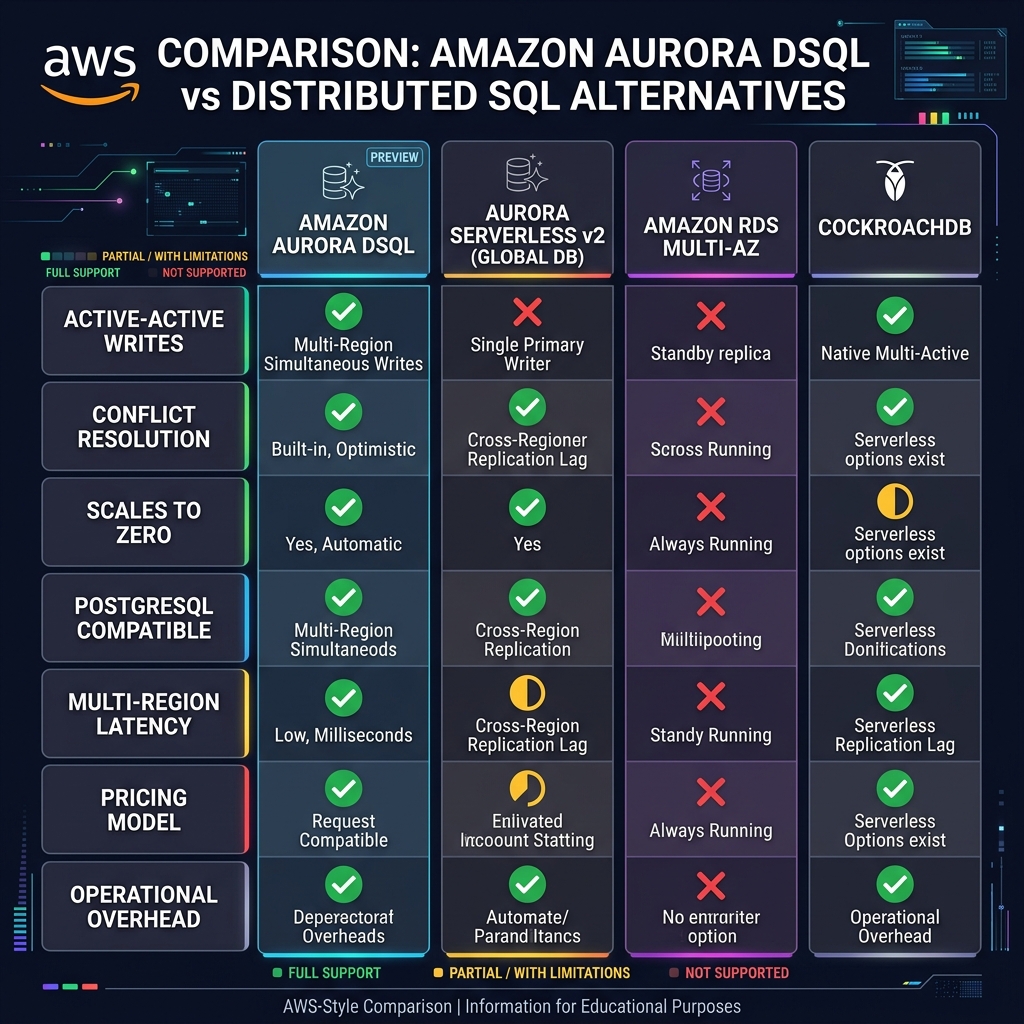
When DSQL Outperforms Global Database — and When It Does Not
flowchart TD
    A["New database decision"] --> B{"Need active-active
multi-region writes?"}
    B -->|"No"| C["Aurora Serverless v2
+ Global Database
(simpler, lower risk)"]
    B -->|"Yes"| D{"Workload conflict rate
low (tenants isolated)?"}
    D -->|"No - high conflict
(e.g. shared inventory)"| E["Redesign schema or
use Aurora Global DB
with async replication"]
    D -->|"Yes"| F{"PostgreSQL features
required?"}
    F -->|"Stored procedures
Triggers / SERIAL PKs"| G["Wait for DSQL roadmap
or refactor application"]
    F -->|"Standard SQL only
UUID PKs acceptable"| H["Aurora DSQL
Strongly recommended"]
    H --> I{"Expected write
RPO requirement"}
    I -->|"Zero RPO needed"| H
    I -->|"Minutes RPO OK"| C
Understanding the Aurora DSQL Cost Model
Aurora DSQL pricing is structured around Distributed Processing Units (DPUs) — a unit that represents a quantum of read or write processing, similar in concept to RCUs and WCUs in DynamoDB. You pay per DPU consumed, per storage GB-month, and for data transfer between regions. There is no hourly charge for idle clusters — Aurora DSQL scales to zero compute cost when there are no active connections.
The scale-to-zero characteristic is genuinely useful for development, staging, and low-traffic production environments. A DSQL cluster with no connections incurs only storage costs. In practice, development clusters with a 10GB database footprint cost under $3/month when idle. For production workloads with continuous traffic, DSQL pricing is competitive with Aurora PostgreSQL Serverless v2 at moderate scale, but the comparison requires modelling your specific DPU consumption patterns — read-heavy workloads that fit in the buffer cache are significantly cheaper than write-heavy or cache-miss-heavy workloads.
pg_stat_statements for the top 20 queries by execution count, then replay representative traffic against DSQL and observe DPU consumption in CloudWatch. Real DPU costs diverge significantly from estimates for workloads with complex JOINs or large result sets.Migration Path from Aurora Serverless v2
If you are evaluating Aurora DSQL as a replacement for an existing Aurora Serverless v2 workload, the migration path has five distinct phases that most teams underestimate in duration:
Phase 1 — Schema audit: Identify all stored procedures, triggers, sequences, SERIAL/BIGSERIAL columns, and SELECT FOR UPDATE usage. This is the remediation inventory. Budget two to four weeks for a complex schema.
Phase 2 — Schema refactoring: Convert SERIAL to UUID, replace stored procedures with application-layer logic, remove triggers by surfacing their logic into the data access layer. This phase often takes longer than expected because stored procedure logic is frequently undocumented.
Phase 3 — Retry logic implementation: Add OCC serialization error handling to every write path. This is not optional. Every transaction that writes to DSQL must handle SQLSTATE 40001 with retry and exponential backoff. Audit every ORM call, every raw SQL execute, every background job.
Phase 4 — Load testing for conflict rate: Run production-representative write traffic against a DSQL cluster and monitor the dsql.OccConflictRate CloudWatch metric. If the conflict rate exceeds 5%, investigate which rows are hotly contested and consider whether the OCC model is appropriate for those access patterns. Rates under 1% indicate the workload is well-suited to DSQL.
Phase 5 — Cutover: Use AWS DMS to replicate data from Aurora Serverless v2 to DSQL during the parallel running period, switch read traffic first, then write traffic, then decommission the source.
# Phase 3 example: Auditing an existing codebase for SELECT FOR UPDATE patterns
# Run this to find code that needs refactoring before DSQL migration

import ast, os, sys

SELECT_FOR_UPDATE_PATTERNS = [
    "SELECT FOR UPDATE",
    "select for update",
    "with_for_update",        # SQLAlchemy ORM pattern
    "FOR UPDATE",
    "NOWAIT",
    "SKIP LOCKED"
]

def scan_file(filepath: str) -> list[dict]:
    findings = []
    with open(filepath, encoding="utf-8", errors="ignore") as f:
        for lineno, line in enumerate(f, 1):
            for pattern in SELECT_FOR_UPDATE_PATTERNS:
                if pattern.lower() in line.lower():
                    findings.append({
                        "file": filepath,
                        "line": lineno,
                        "pattern": pattern,
                        "content": line.strip(),
                        "remediation": "Replace with OCC retry pattern — DSQL does not support row-level locking"
                    })
    return findings

def audit_codebase(root_dir: str, extensions: list[str] = [".py", ".ts", ".java"]) -> list[dict]:
    all_findings = []
    for dirpath, _, filenames in os.walk(root_dir):
        if any(skip in dirpath for skip in [".git", "node_modules", "__pycache__", "venv"]):
            continue
        for fname in filenames:
            if any(fname.endswith(ext) for ext in extensions):
                all_findings.extend(scan_file(os.path.join(dirpath, fname)))
    return all_findings

if __name__ == "__main__":
    findings = audit_codebase(sys.argv[1] if len(sys.argv) > 1 else ".")
    print(f"Found {len(findings)} SELECT FOR UPDATE usage(s) requiring remediation:")
    for f in findings:
        print(f"  {f['file']}:{f['line']} — {f['pattern']}")
        print(f"    Remediation: {f['remediation']}")
Security Architecture for Aurora DSQL
Aurora DSQL enforces encryption at rest using AWS KMS with customer-managed keys (CMK) configurable at cluster creation. Encryption in transit is mandatory — TLS is not optional, there is no plaintext mode. All connections use SSL/TLS by default, enforced by the DSQL endpoint.
Authentication is IAM-only. There are no database-level username/password credentials in the traditional sense. IAM principals (users, roles) are granted permissions using standard IAM policy syntax and mapped to database-level privileges through the aws_lambda_basic_execution_role pattern or dedicated DSQL IAM policies. This eliminates the secret rotation burden of database passwords — IAM tokens rotate automatically — but requires your deployment tooling to be IAM-aware.
VPC integration: Aurora DSQL endpoints are accessible over the public internet by default (protected by IAM auth and TLS), or through VPC endpoints for private connectivity. For enterprise deployments in regulated industries, configuring a VPC endpoint eliminates public internet egress from your database access path, satisfying most network segmentation audit requirements.
Key Takeaways
- Aurora DSQL’s OCC model is genuinely novel — it delivers active-active multi-region writes without a primary writer designation, but only performs optimally when conflict rates are low (workloads where different clients write to disjoint row sets)
- The feature gap is real but shrinking — stored procedures, triggers, SERIAL PKs, and SELECT FOR UPDATE are unsupported as of early 2026; evaluate your schema against this list before committing to a migration
- Retry logic is not optional — every write path in your application must handle SQLSTATE 40001 serialization failures gracefully with exponential backoff; this is the OCC mechanism working correctly, not an error condition
- UUID primary keys are the correct default for DSQL — use
gen_random_uuid()everywhere and remove all SERIAL/sequence dependencies as part of your migration - The cost model rewards bursty, variable workloads — scale-to-zero makes DSQL economically excellent for non-continuous traffic; model your DPU consumption with real traffic before committing to production
- Multi-region data residency requires deliberate planning — DSQL replicates data across all configured regions; scope your clusters to comply with GDPR and regulatory requirements before enabling multi-region mode
Glossary
- Aurora DSQL
- Amazon’s serverless distributed SQL database service announced at re:Invent 2024. Provides PostgreSQL-compatible active-active multi-region writes using Optimistic Concurrency Control rather than traditional pessimistic locking.
- OCC (Optimistic Concurrency Control)
- A concurrency control approach where transactions proceed without acquiring locks. Conflicts are detected only at commit time by comparing the transaction’s read-set against concurrent writes. Commits either succeed atomically or abort (requiring a retry) if a conflict is found.
- Serialization Failure (SQLSTATE 40001)
- The error code returned when an OCC conflict is detected at commit time. Not a bug — it is the correct OCC behaviour signalling that a transaction must be retried. Applications using DSQL must always handle this error with retry logic.
- Distributed Journal
- Aurora DSQL’s internal append-only log used to achieve consensus across regions. Every committed transaction is written to a quorum of journal nodes before becoming visible globally, providing strong durability guarantees.
- DPU (Distributed Processing Unit)
- The billing unit for Aurora DSQL compute consumption. Measured per read and write operation; there is no minimum charge when the cluster has no active connections (scale-to-zero).
- Active-Active Multi-Region Writes
- A database topology where all participating regions can accept write requests simultaneously, with no designated primary writer. Contrasts with Aurora Global Database where only one region accepts writes.
- Scale to Zero
- The property of a serverless database that incurs no compute charges when no connections are active. Aurora DSQL bills only storage when idle, making it economical for development clusters and bursty production workloads.
- SELECT FOR UPDATE
- A PostgreSQL SQL clause that acquires a pessimistic row-level lock to prevent other transactions from modifying the selected rows until the current transaction commits. Incompatible with OCC databases including Aurora DSQL.
- IAM Auth Token
- A short-lived (15-minute) credential generated by AWS SDK that replaces a static database password for Aurora DSQL authentication. Derived from the caller’s IAM identity and never stored in the database.
- OCC Conflict Rate
- The percentage of transactions that abort due to concurrent writes to the same rows. Monitored via the
dsql.OccConflictRateCloudWatch metric. Rates consistently above 5% indicate a workload access pattern mismatch with OCC architecture. - quorum write
- A distributed system commit protocol requiring acknowledgement from a majority (quorum) of replica nodes before confirming a write. DSQL uses quorum writes across regional journal nodes to ensure consistency without a single point of failure.
References & Further Reading
- → Amazon Aurora DSQL — What Is Aurora DSQL?— Official service documentation covering architecture, concepts, and getting started
- → Aurora DSQL — Working with Transactions— OCC transaction model, serialization failure handling, and retry guidance
- → Aurora DSQL — Unsupported PostgreSQL Features— Complete list of PostgreSQL features not supported in Aurora DSQL as of current release
- → Aurora DSQL — IAM Authentication and Access Control— IAM-based authentication, token generation, and VPC endpoint configuration
- → Aurora DSQL — Pricing and DPU Model— DPU billing units, storage pricing, data transfer costs, and scale-to-zero behaviour
- → AWS Database Blog — Introducing Amazon Aurora DSQL— The official launch post explaining design decisions and the OCC transaction architecture
- → Aurora DSQL — Schema Design and UUID Primary Keys— Schema constraints, UUID usage patterns, and multi-tenant design recommendations
- → AWS DMS — Aurora DSQL as a Migration Target— Using Database Migration Service for live replication from Aurora PostgreSQL to DSQL
Discover more from C4: Container, Code, Cloud & Context
Subscribe to get the latest posts sent to your email.